
Showing posts with label monthly. Show all posts
Showing posts with label monthly. Show all posts
Tuesday, June 14, 2016
Keeping a Monthly Master Calendar in Your Planner
Even though it's summertime, a glance at my monthly calendar shows just how overbooked I truly am at the moment.


Monday, May 23, 2016
The Importance of Using a Planner in Crisis Mode
I almost have no words for how hard last week was for me and my family.


Friday, April 8, 2016
Decorating a Planner With Distracting From Planning
***This post may contain affiliate links. See my "Disclaimer" link for additional details.***
Let's all be brutally honest. Giftie Etcetera does not feature the prettiest planner pages on the internet.

Let's all be brutally honest. Giftie Etcetera does not feature the prettiest planner pages on the internet.

Sunday, January 17, 2016
How to Use Your Planner
***This post may contain affiliate links. See my "Disclaimer" link for additional details.***
Today's post is a flashback to 2013. Yes, that was years ago! But it's worth the read.

Today's post is a flashback to 2013. Yes, that was years ago! But it's worth the read.

Monday, November 23, 2015
The Right Planner for Everyone on Your Gift List
***This post may contain affiliate links. See my "Disclaimer" link for additional details.***
A dedicated day planner user - also known around these parts as a plannerd - might ask, "why would I ever buy a day planner for someone else as a gift?"
After all, if you are a Loyal Reader of Giftie Etcetera, you likely already use a planner tailored to you and your needs. That's the goal, anyway. You understand that a planner is a very personal item.
This year, I'm challenging you to share that love of planners with someone in your life who might either need or truly appreciate it!
Since every plannerd (or potential plannerd) is unique, I'll try to share some interesting planners that you might not know about and the unique aspects of each of these planners with you.

A dedicated day planner user - also known around these parts as a plannerd - might ask, "why would I ever buy a day planner for someone else as a gift?"
After all, if you are a Loyal Reader of Giftie Etcetera, you likely already use a planner tailored to you and your needs. That's the goal, anyway. You understand that a planner is a very personal item.
This year, I'm challenging you to share that love of planners with someone in your life who might either need or truly appreciate it!
Since every plannerd (or potential plannerd) is unique, I'll try to share some interesting planners that you might not know about and the unique aspects of each of these planners with you.

Monday, November 2, 2015
3 Common Reasons for Planner Fail (and How to Overcome Them)
Planner peace is so elusive.
People want a way to keep their lives in order and record their thoughts and to dos.
But time and time again, they fail.
Don't be one of those people!

People want a way to keep their lives in order and record their thoughts and to dos.
But time and time again, they fail.
Don't be one of those people!

Sunday, October 25, 2015
10 Tips to Completely Transform How You Use Your Day Planner
***This post may contain affiliate links. See my "Disclaimer" link for additional details.***
On Sundays, I remind you of a classic Giftie post that you might have missed.

On Sundays, I remind you of a classic Giftie post that you might have missed.

Tuesday, September 22, 2015
Organize Your Day with a Planner
***This post may contain affiliate links. See my "Disclaimer" link for additional details.***
Go get your planner or your notebook. I'll wait...

Go get your planner or your notebook. I'll wait...

Friday, July 31, 2015
How to Take Control of Your Time With a Monthly Planner
Somewhere between micromanaging every single moment and not knowing when the party even starts, there is a sweet spot of time management.
I think I have found my sweet spot!
(Check out my new inserts for this academic year. So much pretty, right?)

As much as I discuss planning tasks on this page, my monthly calendar spread is the heart of my time management success.
Here are some of the features of my monthly calendar planner pages that make it easy to use and effective for managing my time.
I think I have found my sweet spot!
(Check out my new inserts for this academic year. So much pretty, right?)

As much as I discuss planning tasks on this page, my monthly calendar spread is the heart of my time management success.
Here are some of the features of my monthly calendar planner pages that make it easy to use and effective for managing my time.
Wednesday, July 29, 2015
Using the Limited Space on a Monthly Planner Spread Efficiently
Monthly planner spreads are set up like a traditional calendar.
At least in America, weeks start on Sundays (though weekly spreads in America usually start on Mondays). The squares are really too small to pack any significant amount of information on them.
I've devised a simple hack that makes the most of a monthly spread so that all necessary information can be captured on the page.

At least in America, weeks start on Sundays (though weekly spreads in America usually start on Mondays). The squares are really too small to pack any significant amount of information on them.
I've devised a simple hack that makes the most of a monthly spread so that all necessary information can be captured on the page.

Wednesday, July 8, 2015
The Ultimate Step-by-Step Guide to Creating a Daily Plan
But if you stop there, you aren't getting everything that you could out of your planner. There are so many other possibilities - filing information that you use on the go, project planning, a quick in-box.
My favorite possibility? Using a planner to create a daily docket (or daily plan). A daily docket lets you get through the day smoothly and accomplish most of your goals.
Here's a step-by-step guide to creating a daily docket that works!
(I use Quo Vadis Textagenda for my daily pages, but you could do this on a Franklin Covey daily page or even on blank paper.)
Step 1: Copy appointments from your monthly pages to your daily docket.
TIP: As you copy things to a daily docket, mark them off with a highlighter. I use the code "D" to show that I put appointments on my daily docket. That way, I still only have one page to check as I go through my day - since the monthly calendar stuff is on the daily docket - and I avoid duplicating or forgetting information.

Step 2: Capture anything from yesterday on your daily docket or elsewhere in your planner.
In the example below, I had a couple of things that I need to do today (like unpack from vacation). Those go on my daily docket for today. But paying the lawn guy can wait until Monday, since it rained today so he won't come out.

Step 3: Copy tasks from weekly pages onto your daily docket, both from today's entry and those things you will do today from your weekly list.

TIP: Draw an arrow in today's entry on your weekly page so that you don't have information in two different places.

Step 4: Add extras, like prep lists of stuff to bring out of the house tomorrow, menu plan, and notes for tomorrow.

Step 5: Put your docket on the side of the planner that does NOT block tomorrow.
Note in the above picture that I have dedicated spaces on my daily docket for each grouping of items:
*am appointments
*pm appointments
*am appointments
*pm appointments
*prep items (for leaving house, like an umbrella or work bag)
*must dos
*should dos
*must dos repeating tags
*should dos repeating tags
*menu
*tomorrow
For more guidance in managing your time and your life, click on Etcetera below and join our Facebook group!
Etcetera.
Linked at:
DIY Sunday Showcase
*must dos
*should dos
*must dos repeating tags
*should dos repeating tags
*menu
*tomorrow
For more guidance in managing your time and your life, click on Etcetera below and join our Facebook group!
Etcetera.
Linked at:
DIY Sunday Showcase


Tuesday, June 30, 2015
How to Write a Due Date in a Planner
I am currently suffering from road trip hair. My head looks like I've slept in a car for a week, which is pretty close to what happened. It was fun and worth it, though!
Even on a massive road trip, deadlines crop up. This week, I had to renew library books on-line, since our road trip was longer than the checkout period. I got a new due date for the books.
My apologies for the road trip quality photo (consider how my hair must look if my picture looks like this), but here's how I handle due dates.

1. Figure out the latest date when the task can be started, not counting the actual due date.
For example, if I need to write a paper that will take about three work days, the latest date is three days before it is due. So, if the assignment is due on July 9, I move back to July 6th, giving me the 6th, 7th, and 8th to work on the assignment.
NOTE: Notice that I do not count the due date itself! That gives me some cushion.
Since the last day that library books can be returned in this case is the actual due date, I write the note one day in advance (July 13th for books due on July 14th).
2. Write DUE in all caps and double underline it.
If it's not critical, it's not really "due" and goes on my task list.
3. Write only in weeklies, unless it is going to be a real time suck. Then, write in weeklies and copy a NOTE into monthlies.
Returning library books or working during normal work hours (already scheduled on monthlies) are not time sucks. Packing for vacation was a time suck, but, again, vacation was already written on monthlies, so no need to note.
Huge time sucks? Studying for a big exam. Getting ready for an inspection at work when it will require overtime beyond scheduled hours.
4. Write actual due date in entry.
The real due date needs to be noted. If you are forced to take advantage of the one day cushion, this information will be valuable.
NOTE: I also write details. In this case, it's which library and how many books.
5. If the one day cushion is needed, recopy the information to the actual due date.
Sometimes, I cannot get to the library the day before books are due. Maybe we wake up with fevers. In those cases, rewriting the information to the actual due date helps me brain remember to deal with it.
This is review for my Loyal Readers, but I hope it still helps someone understand a better way to deal with deadlines.
Etcetera.
Linked at:

Even on a massive road trip, deadlines crop up. This week, I had to renew library books on-line, since our road trip was longer than the checkout period. I got a new due date for the books.
My apologies for the road trip quality photo (consider how my hair must look if my picture looks like this), but here's how I handle due dates.

1. Figure out the latest date when the task can be started, not counting the actual due date.
For example, if I need to write a paper that will take about three work days, the latest date is three days before it is due. So, if the assignment is due on July 9, I move back to July 6th, giving me the 6th, 7th, and 8th to work on the assignment.
NOTE: Notice that I do not count the due date itself! That gives me some cushion.
Since the last day that library books can be returned in this case is the actual due date, I write the note one day in advance (July 13th for books due on July 14th).
2. Write DUE in all caps and double underline it.
If it's not critical, it's not really "due" and goes on my task list.
3. Write only in weeklies, unless it is going to be a real time suck. Then, write in weeklies and copy a NOTE into monthlies.
Returning library books or working during normal work hours (already scheduled on monthlies) are not time sucks. Packing for vacation was a time suck, but, again, vacation was already written on monthlies, so no need to note.
Huge time sucks? Studying for a big exam. Getting ready for an inspection at work when it will require overtime beyond scheduled hours.
4. Write actual due date in entry.
The real due date needs to be noted. If you are forced to take advantage of the one day cushion, this information will be valuable.
NOTE: I also write details. In this case, it's which library and how many books.
5. If the one day cushion is needed, recopy the information to the actual due date.
Sometimes, I cannot get to the library the day before books are due. Maybe we wake up with fevers. In those cases, rewriting the information to the actual due date helps me brain remember to deal with it.
This is review for my Loyal Readers, but I hope it still helps someone understand a better way to deal with deadlines.
Etcetera.
Linked at:
Wednesday, June 17, 2015
Marking Your Monthly Spread to Avoid Stupid Mistakes
I've always used washi tape or big Xs to mark off the unused squares on the monthly spread.
But I upped my game today!
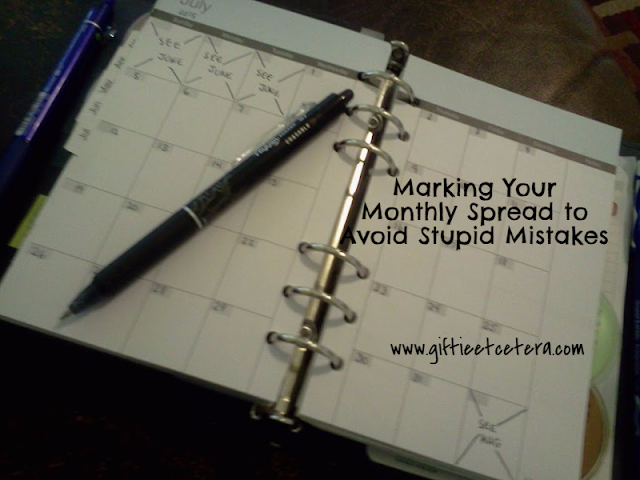
By putting "SEE [OTHER MONTH]" in the middle of each X, I ensure that I don't accidentally write one appointment on the June spread on the 30th and another, conflicting appointment on the July spread.
It's a simple tweak that really makes your planner more effective.
Remember to bookmark Giftie Etcetera to read more productivity and planning tips.
Etcetera.
But I upped my game today!

By putting "SEE [OTHER MONTH]" in the middle of each X, I ensure that I don't accidentally write one appointment on the June spread on the 30th and another, conflicting appointment on the July spread.
It's a simple tweak that really makes your planner more effective.
Remember to bookmark Giftie Etcetera to read more productivity and planning tips.
Etcetera.
Monday, June 15, 2015
Why Your Planner Needs More Paper
Every week or so, I put more paper in my planner.
No, my planner does not weigh 10 pounds!
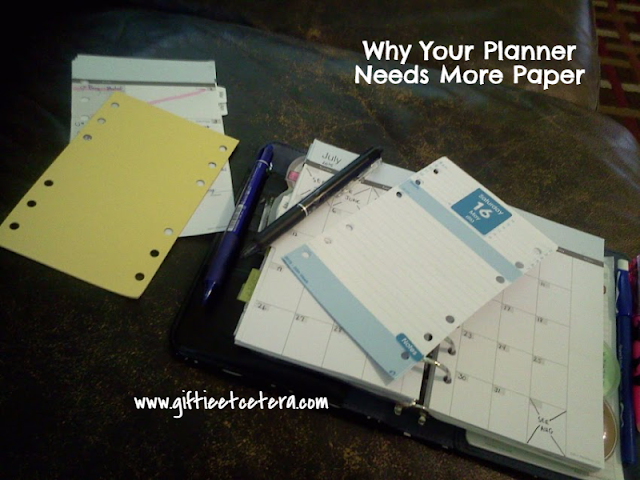
There are just some things that need to be added to my planner on an ongoing basis, so that I don't have to carry this stuff around all the time.
*Next Month's Monthly/Weekly Pages
These don't add any bulk, since I take out last month's pages to archive whenever I do this.
*Blank Paper
I mostly use blank paper for temporary lists, like grocery lists. I toss them as I am done with them, but always need new ones, so I add some one a week.
*Daily Docket Pages
I add a week's worth of daily docket pages at a time.
It seems like a like of work, but because I don't carry tons of extra dailies, months, or blank pages, my planner's profile stays light and slim.
What do you add regularly to your planner?
Etcetera.
No, my planner does not weigh 10 pounds!

There are just some things that need to be added to my planner on an ongoing basis, so that I don't have to carry this stuff around all the time.
*Next Month's Monthly/Weekly Pages
These don't add any bulk, since I take out last month's pages to archive whenever I do this.
*Blank Paper
I mostly use blank paper for temporary lists, like grocery lists. I toss them as I am done with them, but always need new ones, so I add some one a week.
*Daily Docket Pages
I add a week's worth of daily docket pages at a time.
It seems like a like of work, but because I don't carry tons of extra dailies, months, or blank pages, my planner's profile stays light and slim.
What do you add regularly to your planner?
Etcetera.
Wednesday, June 10, 2015
Arrows and Endpoints on a Monthly Planner Spread
When an event spans several days, most people use a long (sometimes color-coded) line to show the duration of the event.
I do the same thing, but with a couple of little tweaks.

I use an arrow to refer to a future or previous week. (See below, next to the eraser on the black pen.)
I use an endmark (vertical line) to refer to the beginning or end of a timeline. (See below, next to the eraser on the blue pen.)

It makes sure that, should vacation go from June into July, I tell tell that whether glancing at June or July (due to arrows instead of endpoints between June 30th and July 1st).
If you like this tip, please share on social media.
Etcetera.
I do the same thing, but with a couple of little tweaks.

I use an arrow to refer to a future or previous week. (See below, next to the eraser on the black pen.)
I use an endmark (vertical line) to refer to the beginning or end of a timeline. (See below, next to the eraser on the blue pen.)

It makes sure that, should vacation go from June into July, I tell tell that whether glancing at June or July (due to arrows instead of endpoints between June 30th and July 1st).
If you like this tip, please share on social media.
Etcetera.
Monday, June 1, 2015
A Smart Tip for Archiving Undated Planner Pages
I been using undated planner pages from Plan Ahead for a long time. Each month, I toss them into my archive box, binder-clipped to the rest of the year's pages.

I decided to look back through my archives.
Oh oh!
I never put YEAR dates on my undated planner pages. I can figure out the year, if I have the birth of a baby or something listed on the pages, but what if I don't? And do I really want to go through all that trouble?
Instead, I added the year to my monthly pages.
Mischief managed!
If you enjoyed this tip, please share on social media.
Etcetera.

I decided to look back through my archives.
Oh oh!
I never put YEAR dates on my undated planner pages. I can figure out the year, if I have the birth of a baby or something listed on the pages, but what if I don't? And do I really want to go through all that trouble?
Instead, I added the year to my monthly pages.
Mischief managed!
If you enjoyed this tip, please share on social media.
Etcetera.
Friday, May 29, 2015
Stop Cookie Cutter Planning
Cookie cutters are useful. If you want a plate full of cookies that look exactly alike, use a cookie cutter for consistency.
But planners are not about consistency (except, of course, about their consistent use). They are about practicality.
A planner must work for you, and since you aren't a cookie, a cutter cutter planner won't do.

Ring-bound, spiral, or arc?
Monthly, weekly, or daily?
Horizontal? Vertical? Printed holidays? Note pages? Addresses? Project planning? Menus? Household tasks?
The only way to create a planner that fits you is to think about your life.
I don't know any easy way to show this except to tell you about my life. (Projects, files, monthly, weekly, and daily refer to parts of my planner.)
Parenting
I'm a mom, so I have to keep track of PTO meetings, school calendars, lunch payments, and project deadlines. Also, my planner has to be very portable, to bring to volunteer meetings, events, and occasional substitute teaching. I need to oversee chores and homework and drive the kids to karate practice.
Tools:
Projects - to plan my volunteer work
Files - to store each year's "First Day of School" checklist
Monthly - to book meetings and practice; to note school calendar
Weekly - for tasks and deadlines, like pay lunch money
Daily- for planning all of the parenting responsibilities with everything else
Working
I'm a lawyer who works part-time, mostly from home, as a staff attorney for a company.
Tools:
Laptop - to research and write; to file
OneNote - to outline and edit
Monthly - to schedule appointments and note paycheck periods
Weekly - to note deadlines and time sheet requirements
Daily - for making a list of what needs doing today
Householding
I am home (not working or doing carpool) about 10 hours more than my husband each week (and more during his busy overtime season). I do much (but definitely not all) of the housework. I do all the grocery shopping and the majority of the cooking.
Monthly - to note grocery shopping days
Weekly - to write menus and time-sensitive tasks
Laptop - to track daily household tasks
Daily - to make a plan for the day
I'll stop there, but you get the idea.
I would add that I don't have a lot of set meetings during the day most of the time, so I don't need a lot of scheduling space. Vertical weeklies don't work for me, since most of my stuff is not scheduled. I also don't need addresses in the planner. Those are captured electronically.
The point is that I stopped and created a recipe for my planning. I decided what I need and what I do need, and I created a system that deals with that!
Someone else's system might have elements that work for you, but the system that YOU create is the one that will make your life easier.
Join us at Facebook in our discussions of customizing your planner for you by clicking on my signature below.
Etcetera.

But planners are not about consistency (except, of course, about their consistent use). They are about practicality.
A planner must work for you, and since you aren't a cookie, a cutter cutter planner won't do.

Ring-bound, spiral, or arc?
Monthly, weekly, or daily?
Horizontal? Vertical? Printed holidays? Note pages? Addresses? Project planning? Menus? Household tasks?
The only way to create a planner that fits you is to think about your life.
I don't know any easy way to show this except to tell you about my life. (Projects, files, monthly, weekly, and daily refer to parts of my planner.)
Parenting
I'm a mom, so I have to keep track of PTO meetings, school calendars, lunch payments, and project deadlines. Also, my planner has to be very portable, to bring to volunteer meetings, events, and occasional substitute teaching. I need to oversee chores and homework and drive the kids to karate practice.
Tools:
Projects - to plan my volunteer work
Files - to store each year's "First Day of School" checklist
Monthly - to book meetings and practice; to note school calendar
Weekly - for tasks and deadlines, like pay lunch money
Daily- for planning all of the parenting responsibilities with everything else
Working
I'm a lawyer who works part-time, mostly from home, as a staff attorney for a company.
Tools:
Laptop - to research and write; to file
OneNote - to outline and edit
Monthly - to schedule appointments and note paycheck periods
Weekly - to note deadlines and time sheet requirements
Daily - for making a list of what needs doing today
Householding
I am home (not working or doing carpool) about 10 hours more than my husband each week (and more during his busy overtime season). I do much (but definitely not all) of the housework. I do all the grocery shopping and the majority of the cooking.
Monthly - to note grocery shopping days
Weekly - to write menus and time-sensitive tasks
Laptop - to track daily household tasks
Daily - to make a plan for the day
I'll stop there, but you get the idea.
I would add that I don't have a lot of set meetings during the day most of the time, so I don't need a lot of scheduling space. Vertical weeklies don't work for me, since most of my stuff is not scheduled. I also don't need addresses in the planner. Those are captured electronically.
The point is that I stopped and created a recipe for my planning. I decided what I need and what I do need, and I created a system that deals with that!
Someone else's system might have elements that work for you, but the system that YOU create is the one that will make your life easier.
Join us at Facebook in our discussions of customizing your planner for you by clicking on my signature below.
Etcetera.
Friday, May 1, 2015
Planner Tip: Mark Out Extra Days on Monthly Pages
Yesterday, I was teaching exponents to 6th graders.
If you don't remember exponents, an exponent equation includes a base number with a superscript number representing the exponent to the upper right.
3
2
Exponents are read as in the following example: 2 to the 3rd power.
To solve that equation, the student would multiply the base number, 2, by itself for the number of times indicated in the exponent, 3.
2 x 2 x 2 = 4 x 2 = 8
So, 2 to the 3rd power equals 8.
As you might guess, a lot of students did this instead:
2 x 3 = 6
The students were very smart. They understand how exponents work, but they were struggling with paying attention to the rule. Since our brains process so much automatically, their brains would process the question as 2 x 3 and they would answer carelessly.
I do the same thing with my planner. I am easily distracted and often do things without stopping to consider them.
Things are so automatic that I will often write stuff in an undated box in my monthly planner.
To solve that problem, when setting up monthly pages, don't forget the simple act of marking out the undated, unused spaces that represent days that do not fall within a particular month.

That simple planner hack will take care of the problem of mindlessly entering information in the wrong part of the page.
Sometimes, I color in the empty blocks. I've used washi tape or markers to fill in the boxes. But, somehow, I cross out the boxes that will remain unused every time I set up a monthly page.
Try it. It's easier that exponents and just might work for you!
Etcetera.
If you don't remember exponents, an exponent equation includes a base number with a superscript number representing the exponent to the upper right.
3
2
Exponents are read as in the following example: 2 to the 3rd power.
To solve that equation, the student would multiply the base number, 2, by itself for the number of times indicated in the exponent, 3.
2 x 2 x 2 = 4 x 2 = 8
So, 2 to the 3rd power equals 8.
As you might guess, a lot of students did this instead:
2 x 3 = 6
The students were very smart. They understand how exponents work, but they were struggling with paying attention to the rule. Since our brains process so much automatically, their brains would process the question as 2 x 3 and they would answer carelessly.
I do the same thing with my planner. I am easily distracted and often do things without stopping to consider them.
Things are so automatic that I will often write stuff in an undated box in my monthly planner.
To solve that problem, when setting up monthly pages, don't forget the simple act of marking out the undated, unused spaces that represent days that do not fall within a particular month.
That simple planner hack will take care of the problem of mindlessly entering information in the wrong part of the page.
Sometimes, I color in the empty blocks. I've used washi tape or markers to fill in the boxes. But, somehow, I cross out the boxes that will remain unused every time I set up a monthly page.
Try it. It's easier that exponents and just might work for you!
Etcetera.
Sunday, March 8, 2015

Wednesday, February 4, 2015
Anatomy of a Planner: The Monthly Spread
Even people who don't use a planner often have a simple monthly calendar for keeping track of appointments and events.
In my planner, the monthly area is guarded carefully so that tasks almost never end up there. As a result, it gives a great overview of my actual schedule.
.png "Anatomy of a Monthly Planner Page")
Monthly Spread Tips (clockwise from upper left corner)
*There isn't a lot of room, so write times as simply as possible.
*Sometimes, a task is particularly time-consuming and worth scheduling. Those entries should be rare, but grocery shopping is definitely one of those in my planner.
*When there is a month-long plan (like my blog plan), track it on the monthly page.
*Use a question mark for uncertain events. Otherwise, you won't consider those when scheduling something else.
*Mark out undated squares completely.
*Key due dates that affect the schedule go on monthlies. For example, my time sheets are due every two weeks. Since they dictate the days that I work or don't work, TS goes on my monthlies.
*Use a bar to cover several dates with travel or one event.
*Include locations of events, where necessary.
*The monthlies are the best place to track workouts or billable hours that count toward a monthly goal.
*Circle repeating events so you know to recopy them once the event passes.
I'd love to hear how you use your monthly spreads, especially if you do things differently than I do!
Etcetera.
In my planner, the monthly area is guarded carefully so that tasks almost never end up there. As a result, it gives a great overview of my actual schedule.
Monthly Spread Tips (clockwise from upper left corner)
*There isn't a lot of room, so write times as simply as possible.
*Sometimes, a task is particularly time-consuming and worth scheduling. Those entries should be rare, but grocery shopping is definitely one of those in my planner.
*When there is a month-long plan (like my blog plan), track it on the monthly page.
*Use a question mark for uncertain events. Otherwise, you won't consider those when scheduling something else.
*Mark out undated squares completely.
*Key due dates that affect the schedule go on monthlies. For example, my time sheets are due every two weeks. Since they dictate the days that I work or don't work, TS goes on my monthlies.
*Use a bar to cover several dates with travel or one event.
*Include locations of events, where necessary.
*The monthlies are the best place to track workouts or billable hours that count toward a monthly goal.
*Circle repeating events so you know to recopy them once the event passes.
I'd love to hear how you use your monthly spreads, especially if you do things differently than I do!
Etcetera.