***This post may contain affiliate links. See my "Disclaimer" link for additional details.***
As an advocate of one planner for one life, it might surprise my Loyal Readers to learn that I use a notebook at work.
Showing posts with label note. Show all posts
Tuesday, September 6, 2016
Thursday, May 5, 2016
The Truth About Mothering a Child with Exceptional Needs
I've drafted the first line of this post over ten times. It started as a celebration of mothers who raise kids with exceptional needs.
But that wasn't enough.
It morphed into a cutesy illustration of what moms of "normal" children can expect - footprint art, tissue paper flowers, or breakfast made from cereal and spilled milk - versus what moms of kiddos with special needs can expect.
But if a child can't remove his corrective foot braces, has inadequate fine motor skills, or had seizures pretty much every day this week, moms already know they won't be getting that traditional stuff. They don't need me to tell them (or you) that.
I owe it to the mom who stood by me in the special park (the one with a wheelchair swing and an adult-sized harness swing) - watching our two "probably have autism but doctors are nervous to label them" kids to make sure they were at least not physically mean to each other - to tell the truth.
But that wasn't enough.
It morphed into a cutesy illustration of what moms of "normal" children can expect - footprint art, tissue paper flowers, or breakfast made from cereal and spilled milk - versus what moms of kiddos with special needs can expect.
But if a child can't remove his corrective foot braces, has inadequate fine motor skills, or had seizures pretty much every day this week, moms already know they won't be getting that traditional stuff. They don't need me to tell them (or you) that.
I owe it to the mom who stood by me in the special park (the one with a wheelchair swing and an adult-sized harness swing) - watching our two "probably have autism but doctors are nervous to label them" kids to make sure they were at least not physically mean to each other - to tell the truth.
Monday, April 25, 2016
Why You Should Be Taking Notes in Your Planner
***This post may contain affiliate links. See my "Disclaimer" link for additional details.***
I love that moment when I sit down with a blank planner page.
Filling in my schedule and listing my tasks, cup of coffee in hand, is so much more fulfilling than doing the tasks! (Truth, right?!?)
I love that moment when I sit down with a blank planner page.
Filling in my schedule and listing my tasks, cup of coffee in hand, is so much more fulfilling than doing the tasks! (Truth, right?!?)
Thursday, January 14, 2016
Using a Planner to Make Filing Easier
***This post may contain affiliate links. See my "Disclaimer" link for additional details.***
Filing is the worst chore in the universe for some people. I hear about it all the time.
Tell you what...I'll do your filing if you scrub my bathtubs! I hate bathtubs more than any other chore.
Also, I've found a way to deal with my piles of unfiled papers that actually works.
Filing is the worst chore in the universe for some people. I hear about it all the time.
Tell you what...I'll do your filing if you scrub my bathtubs! I hate bathtubs more than any other chore.
Also, I've found a way to deal with my piles of unfiled papers that actually works.
Friday, January 1, 2016
Monday, December 7, 2015
Planner Sections and How To Use Them
Whenever I get new information, I face the dilemma of where to put that information in my planner.
I can get paralyzed by the decision of where to write something down. If it goes in the wrong section of my planner, I'll never find it again or it'll crowd out more important information.
For someone with a touch of OCD (my therapist says I'm "on the spectrum"), the anxiety is just too much. I need a system to deal.
I can get paralyzed by the decision of where to write something down. If it goes in the wrong section of my planner, I'll never find it again or it'll crowd out more important information.
For someone with a touch of OCD (my therapist says I'm "on the spectrum"), the anxiety is just too much. I need a system to deal.
Sunday, October 4, 2015
Take Care of the Insides of Your Planner
Most people take care of the outsides of their planners - wiping them down, protecting them in bags, or treating leather.
But the insides of a planner are the important part!
What are you doing to care for those parts?
Check out this Classic Giftie post to find out how I care for the insides of my planner.
As always when I look back on a classic post, I update with things that I am currently doing. So, this morning, I read the old post and did the following:
*pulled out some projects that are complete and filed them away,
*filed away my September calendar pages, and
*created a task to redo my ABC Notes tabs, as they are worn out (and I don't have time to do it immediately).
Let me know in the comments what you did to care for the insides of your planner this week.
Etcetera.
If you enjoy what you read at Giftie Etcetera, please share on social media. Click here to join the Giftie Etcetera Facebook group.
Partied at: Happiness is Homemade, Simply Sundays, Inspiration Monday, Sundays Down Under, Mommy Monday, Manic Mondays, Monday Musings. Marvelous Monday, Something to Talk About, Anything Goes, Good Morning Mondays, Create Link Inspire, Roses of Inspiration, Country Fair Blog Party, Worthwhile Wednesdays, Wednesday Showcase, Link It To Me, A Little R and R, Wednesday's Wisdom, Way Back Wednesday, No Rules Weekend, Awesome Life Friday, Friday Features, Your Turn to Shine, Momma Told Me, Get Your Shine On, Weekend Blog Hop, Pretty Pintastic, Funtastic Friday, Reasons to Skip the Housework, Saturday Sharefest, My Favorite Things, Share the Wealth, Small Victories Sunday
But the insides of a planner are the important part!
What are you doing to care for those parts?
Check out this Classic Giftie post to find out how I care for the insides of my planner.
As always when I look back on a classic post, I update with things that I am currently doing. So, this morning, I read the old post and did the following:
*pulled out some projects that are complete and filed them away,
*filed away my September calendar pages, and
*created a task to redo my ABC Notes tabs, as they are worn out (and I don't have time to do it immediately).
Let me know in the comments what you did to care for the insides of your planner this week.
Etcetera.
If you enjoy what you read at Giftie Etcetera, please share on social media. Click here to join the Giftie Etcetera Facebook group.
Partied at: Happiness is Homemade, Simply Sundays, Inspiration Monday, Sundays Down Under, Mommy Monday, Manic Mondays, Monday Musings. Marvelous Monday, Something to Talk About, Anything Goes, Good Morning Mondays, Create Link Inspire, Roses of Inspiration, Country Fair Blog Party, Worthwhile Wednesdays, Wednesday Showcase, Link It To Me, A Little R and R, Wednesday's Wisdom, Way Back Wednesday, No Rules Weekend, Awesome Life Friday, Friday Features, Your Turn to Shine, Momma Told Me, Get Your Shine On, Weekend Blog Hop, Pretty Pintastic, Funtastic Friday, Reasons to Skip the Housework, Saturday Sharefest, My Favorite Things, Share the Wealth, Small Victories Sunday
Wednesday, August 12, 2015
Planning to Break the Fashion Rules
My heart pounds. I click on the light switch, staring into the claustrophobic space. Sweat pools under my arms. My breath hitches.
I have to find something to wear.
Wednesday, March 25, 2015
How to Create Perfect Lines in a Planner
I have a simple trick from my days as a middle school teacher that I thought I should share with my planner peeps.
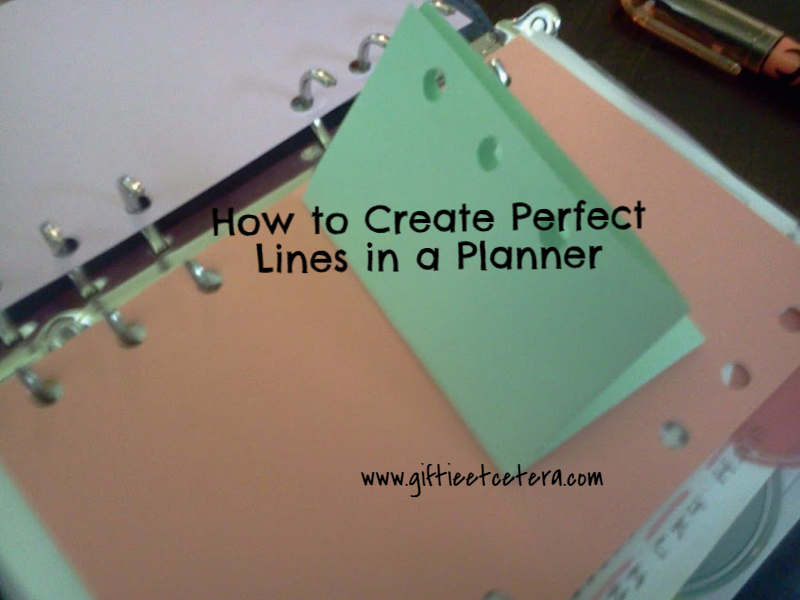
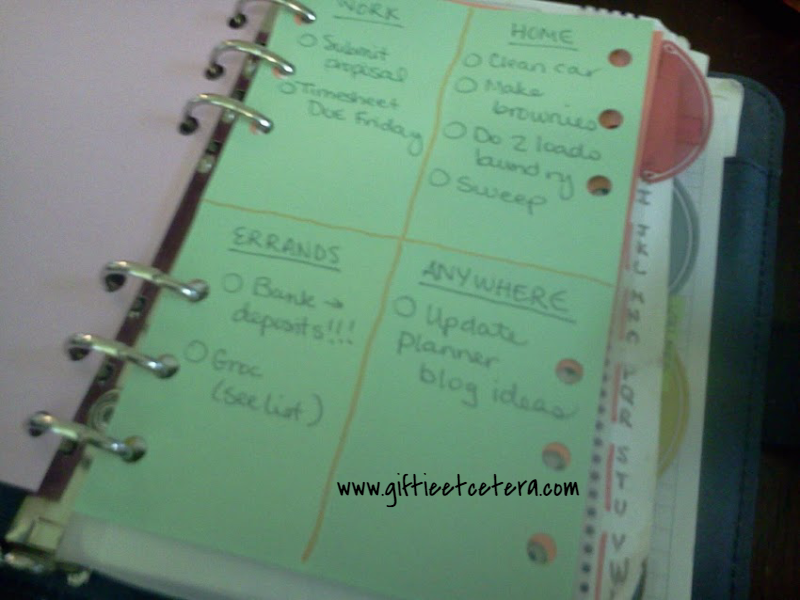
When faced with a blank piece of paper, you can provide some invisible structure by folding the paper into quadrants. Unfold it, and you have four perfect squares.
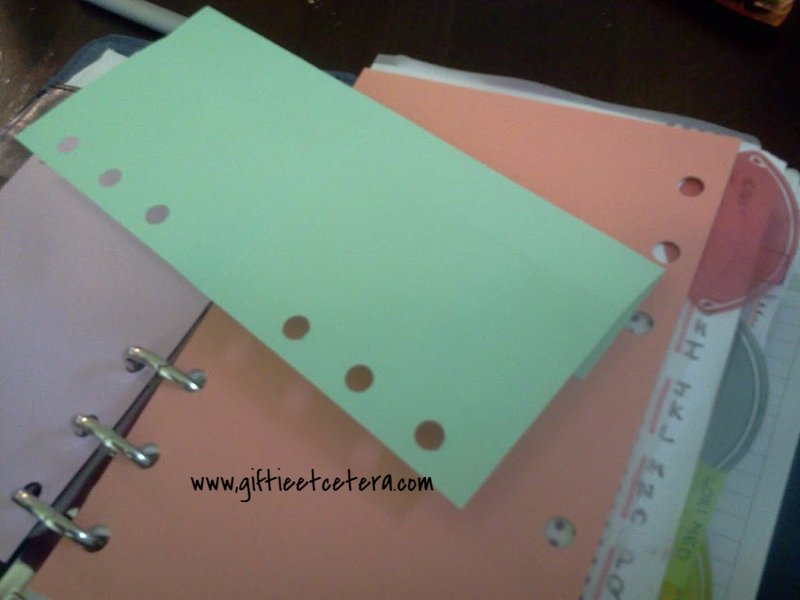
TIP: Line up the edges of the paper for perfect lines.
Note: I traced the lines for the picture, but you don't have to trace them.
In the picture below, I use the quadrants to make several different to do lists, based on context.
You could also make packing lists based on which bag will carry each item (carry-on, purse, tote bag, etc.) or party planning lists (menu, invitations, decorations, games).
Sometimes, I do this for grocery lists, based on the physical set-up of my grocery store.
Another good idea is to use two of these pages, side by side, to make an undated weekly spread and one extra box for weekly notes!
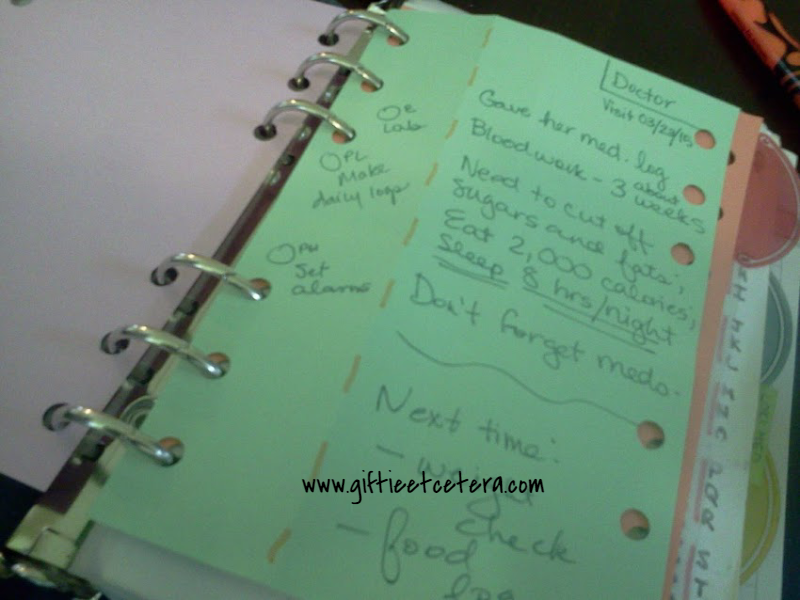
If you are note taking, try folding the paper into two parts. I like them to be not quite half and half. Instead, I folded about a third of the page (again, matching up the edges to make a perfect fold).
Then, when I take notes, tasks and important dates go to the left and notes go to the right.
Students can use this trick to study, writing terms and questions on the left.
Can you think of others uses for folded paper in your planner?
Etcetera.
Linked at:
When faced with a blank piece of paper, you can provide some invisible structure by folding the paper into quadrants. Unfold it, and you have four perfect squares.
TIP: Line up the edges of the paper for perfect lines.
Note: I traced the lines for the picture, but you don't have to trace them.
In the picture below, I use the quadrants to make several different to do lists, based on context.
You could also make packing lists based on which bag will carry each item (carry-on, purse, tote bag, etc.) or party planning lists (menu, invitations, decorations, games).
Sometimes, I do this for grocery lists, based on the physical set-up of my grocery store.
Another good idea is to use two of these pages, side by side, to make an undated weekly spread and one extra box for weekly notes!
If you are note taking, try folding the paper into two parts. I like them to be not quite half and half. Instead, I folded about a third of the page (again, matching up the edges to make a perfect fold).
Then, when I take notes, tasks and important dates go to the left and notes go to the right.
Students can use this trick to study, writing terms and questions on the left.
Can you think of others uses for folded paper in your planner?
Etcetera.
Linked at:
Wednesday, February 11, 2015
5 Essential Sections That Every Planner Needs
***This post may contain affiliate links. See my "Disclaimer" link for additional details.***
When setting up or updating a planner, one of the most critical decisions is how many sections (or tabs) to have.
There are five that cover almost any needs.
1. PROJECTS
Projects includes any current, multiple step plans that are happening.
Examples:
*logging my youngest child's behavior for a potential epilepsy diagnosis
*doing a research project for work
*planning a birthday party
2. TASKS
Most tasks belong on the weekly calendar pages because they are active and coming due, but for those that need remembering but not on a serious timeline, this is the place to dump them.
Examples:
*clean out the deep freeze
*edit my novel
*make an emergency tote bag
3. CALENDAR
The monthly and weekly pages are the heart of the planner. They go in the middle so that the planner is easy to write in.
Examples:
*doctor's appointments (on monthly pages)
*pay tickets (on weekly pages)
*schedule dentist (on weekly pages)
4. FUTURE
Like Tasks, Future is a catch-all spot for anything happening after the calendar ends. (No tab is pictured because I put it right behind my calendar tab.)
Examples:
*husband's birthday next year
*yearly physical
*tax deadlines beyond the immediate ones
5. NOTES
Notes are exactly like Projects, but they are currently inactive, yet needed for reference.
Examples:
*list of current medications
*list of sizes for clothes shopping
*contact information in case of emergency
The full page sized Avery Dividers cut down to fit any size planner really easily.
Make sure to Pin this simple list for future reference!
Etcetera.
Partied at: A Little R and R, Wise Woman Linkup, Worthwhile Wednesdays, Waiting on Wednesday, Way Back Wednesday
When setting up or updating a planner, one of the most critical decisions is how many sections (or tabs) to have.
There are five that cover almost any needs.
1. PROJECTS
Projects includes any current, multiple step plans that are happening.
Examples:
*logging my youngest child's behavior for a potential epilepsy diagnosis
*doing a research project for work
*planning a birthday party
2. TASKS
Most tasks belong on the weekly calendar pages because they are active and coming due, but for those that need remembering but not on a serious timeline, this is the place to dump them.
Examples:
*clean out the deep freeze
*edit my novel
*make an emergency tote bag
3. CALENDAR
The monthly and weekly pages are the heart of the planner. They go in the middle so that the planner is easy to write in.
Examples:
*doctor's appointments (on monthly pages)
*pay tickets (on weekly pages)
*schedule dentist (on weekly pages)
4. FUTURE
Like Tasks, Future is a catch-all spot for anything happening after the calendar ends. (No tab is pictured because I put it right behind my calendar tab.)
Examples:
*husband's birthday next year
*yearly physical
*tax deadlines beyond the immediate ones
5. NOTES
Notes are exactly like Projects, but they are currently inactive, yet needed for reference.
Examples:
*list of current medications
*list of sizes for clothes shopping
*contact information in case of emergency
The full page sized Avery Dividers cut down to fit any size planner really easily.
Make sure to Pin this simple list for future reference!
Etcetera.
Partied at: A Little R and R, Wise Woman Linkup, Worthwhile Wednesdays, Waiting on Wednesday, Way Back Wednesday
Sunday, October 5, 2014
Beyond A Calendar: New Ways To Use Your Planner
***This post may contain affiliate links. See my "Disclaimer" link for additional details.***
Yesterday I was stuck in a dollar store, browsing to kill time while my husband and children got hair cuts next door. The store had a display of calendars. Understand, none of the calendars were anything that I would actually purchase. But I like to examine the features.
For example, "mom" calendars these days have separate little squares for each family member. This confuses me.
Mom either needs to know because she is driving/cooking/chaperoning/dressing the kids or she only needs an FYI - in my mind that means two columns are needed, not a random five columns. And what if she has more or less than three kids? I used a Daytimer Family Plus for a while, but the squares were a waste for me. (I loved the layout otherwise.)
What I really focused on, though, were the little pocket calendars. They are about the size of a checkbook and have little sayings or designs on the outside. Inside, they are simply a monthly calendar.
Honestly, for a person who has no stressful planner needs - doesn't input appointments on their cell phone, isn't running a household, isn't a student, and uses something like Outlook at work - one of these would likely succeed in keeping track of a schedule. Add a pretty, tiny notebook, and you might survive the world with a pocket calendar. Maybe.

But a pocket calendar, or a wall calendar, for that matter, simply cannot do what a planner can do for you.
This is my favorite pocket calendar (not like the ones in the dollar store)..
A smart phone might work, if you use it in all the ways that a person can use a planner and if you aren't a person who learns from writing things down. But it would take a lot of work, strategy, and input. I, personally, don't like a lot of work.
A planner, on the other hand, is a tool instead of a mere calendar.
With a planner, you can go so far beyond a calendar.
*Mind Dump
Experienced planners know what a mind dump is - taking everything that is bothering you or keeping you worried or awake and dumping it onto a piece of paper. Mind dumps are not a new idea. Counselors have suggested for decades that you write down your problems before bed (or at 3 a.m. when you wake in a panic). But instead of their silly notepad next to your pillow idea, try your planner.
Valuable ideas, thoughts, and reminders have been lost on random sheets of paper. If you dump your thoughts, but fail to dump them in a place where you can process them later, they are gone. How can you rely on that?
I brain dump directly onto my dashboard (a blank page at the very front of my planner).
*Brainstorm
Brainstorming is different than a brain dump. Brainstorming is purposeful and generally limited to a particular topic.
If I am thinking of ideas for a blog, I might brainstorm.
At the beginning of setting up any project, I brainstorm.
For example, for Christmas, I need to think of everything that I need to plan. Gifts, Santa, wrapping paper, parties, travel, decorations...everything gets brain dumped, but it's a topic-specific dump, without much filtering. Then, I organize the ideas and create a project.
*Sketch
Sometimes, you need a visual of a project. How long will each step take? What order should the outline of the legal memo take? A planner gives you an instant notebook, available to you whenever and wherever you are.
*Draw
A smart phone doesn't let you draw a picture of what you are envisioning. Now, I know that many of you are not artists. But for those who need a visual, paper has a strong advantage over technology.
I don't draw beyond a rogue doodle, but I sketch charts for goals, to visualize progress.
*Note
At a meeting? Meeting with the teacher?
A planner is an excellent place to take notes. I suggest a two-column approach.
*Order
A planner allows you to put initial tasks, subsequent tasks, and follow-ups in that order.
That's pretty hard to do on a smartphone.
*Organize
A planner lets you separate appointments, tasks, notes, and projects.
*Achieve
I'm been trying to lose weight for a long time. The only thing that is helping me achieve that goal and actually working? My planner.
I open it to log calorie intake and exercise. I make notes about what I can do to burn calories in limited time and which snacks are yummy and low-cal.
*Record
A planner gives you a place to record the confirmation number when you book a hotel, that you owe your sister $10, and that it's time to get your hair colored.
*Plan
Finally, unlike mindlessly entering tasks or appointments on a cell phone, and planner, by its nature, helps you actually think about and plan what you will do. You have limited space and have to make decisions on the front end, when you are thoughtful, instead of in a rush later.
If you enjoyed this posts, don't forget to read my other popular posts (in the right sidebar).
Etcetera.
Yesterday I was stuck in a dollar store, browsing to kill time while my husband and children got hair cuts next door. The store had a display of calendars. Understand, none of the calendars were anything that I would actually purchase. But I like to examine the features.
For example, "mom" calendars these days have separate little squares for each family member. This confuses me.
Mom either needs to know because she is driving/cooking/chaperoning/dressing the kids or she only needs an FYI - in my mind that means two columns are needed, not a random five columns. And what if she has more or less than three kids? I used a Daytimer Family Plus for a while, but the squares were a waste for me. (I loved the layout otherwise.)
What I really focused on, though, were the little pocket calendars. They are about the size of a checkbook and have little sayings or designs on the outside. Inside, they are simply a monthly calendar.
Honestly, for a person who has no stressful planner needs - doesn't input appointments on their cell phone, isn't running a household, isn't a student, and uses something like Outlook at work - one of these would likely succeed in keeping track of a schedule. Add a pretty, tiny notebook, and you might survive the world with a pocket calendar. Maybe.
This is my favorite pocket calendar (not like the ones in the dollar store)..
A smart phone might work, if you use it in all the ways that a person can use a planner and if you aren't a person who learns from writing things down. But it would take a lot of work, strategy, and input. I, personally, don't like a lot of work.
A planner, on the other hand, is a tool instead of a mere calendar.
With a planner, you can go so far beyond a calendar.
*Mind Dump
Experienced planners know what a mind dump is - taking everything that is bothering you or keeping you worried or awake and dumping it onto a piece of paper. Mind dumps are not a new idea. Counselors have suggested for decades that you write down your problems before bed (or at 3 a.m. when you wake in a panic). But instead of their silly notepad next to your pillow idea, try your planner.
Valuable ideas, thoughts, and reminders have been lost on random sheets of paper. If you dump your thoughts, but fail to dump them in a place where you can process them later, they are gone. How can you rely on that?
I brain dump directly onto my dashboard (a blank page at the very front of my planner).
*Brainstorm
Brainstorming is different than a brain dump. Brainstorming is purposeful and generally limited to a particular topic.
If I am thinking of ideas for a blog, I might brainstorm.
At the beginning of setting up any project, I brainstorm.
For example, for Christmas, I need to think of everything that I need to plan. Gifts, Santa, wrapping paper, parties, travel, decorations...everything gets brain dumped, but it's a topic-specific dump, without much filtering. Then, I organize the ideas and create a project.
*Sketch
Sometimes, you need a visual of a project. How long will each step take? What order should the outline of the legal memo take? A planner gives you an instant notebook, available to you whenever and wherever you are.
*Draw
A smart phone doesn't let you draw a picture of what you are envisioning. Now, I know that many of you are not artists. But for those who need a visual, paper has a strong advantage over technology.
I don't draw beyond a rogue doodle, but I sketch charts for goals, to visualize progress.
*Note
At a meeting? Meeting with the teacher?
A planner is an excellent place to take notes. I suggest a two-column approach.
A planner allows you to put initial tasks, subsequent tasks, and follow-ups in that order.
That's pretty hard to do on a smartphone.
*Organize
A planner lets you separate appointments, tasks, notes, and projects.
*Achieve
I'm been trying to lose weight for a long time. The only thing that is helping me achieve that goal and actually working? My planner.
I open it to log calorie intake and exercise. I make notes about what I can do to burn calories in limited time and which snacks are yummy and low-cal.
*Record
A planner gives you a place to record the confirmation number when you book a hotel, that you owe your sister $10, and that it's time to get your hair colored.
*Plan
Finally, unlike mindlessly entering tasks or appointments on a cell phone, and planner, by its nature, helps you actually think about and plan what you will do. You have limited space and have to make decisions on the front end, when you are thoughtful, instead of in a rush later.
If you enjoyed this posts, don't forget to read my other popular posts (in the right sidebar).
Etcetera.
Wednesday, August 20, 2014
The Care And Upkeep Of The Insides Of A Planner
***This post may contain affiliate links. These links help you find the items that I use in my planner and financially support this blog. See my "Disclaimer" link for additional details.***
If you don't decorate much (and I don't), write things where they are supposed to go (I do), and have a decent system in place (yep), your planner rarely needs a tune-up.
Still, sometimes things just need to be updated. I am not talking about revising a system, but just doing routine upkeep.
For example, my projects index was old and full of scratch-outs and needed to be replaced. I didn't change anything about my index page except to only recopy what was still relevant.
Note that I only have two projects going right this minute. I have three work projects, actually, but those are in my work planner. Also, I am about to plan a birthday party, but the initial planning session will happen this weekend.
The reason that I don't change the system is that, after all, if a system is working for you, you should probably keep it. If you want to see how I use an ABC file as my Projects Index WITHOUT putting documents in ABC order, click on this link.
I also updated my budget pages. Yes, I've already spent too much this month.
I made more of the my "homework sheets" (where I track the kids' homework assignments) and more daily pages.
Note that I cut the pages slightly smaller than my regular pages. That is intentional. First, it frees me from getting the measurements absolutely perfect. Second, it means I can clip everything together with a Magnetic Page Marker and still see my weekly spread easily.
I also highlighted (using FriXion Erasable Highlighters, which is important, since I messed up the first time) the annual spread on my Quo Vadis future pages. I do that so that I don't accidentally schedule a conflict. One glance at October 27th, for example, shows a colored in annual spread square. That means to check the future page for October 27th and see what is already booked (my sister's birthday) before booking something else.
If you think it's time for a tune-up, just flip through your planner, looking for anything that could use some recopying or recutting, list it on a blank piece of paper, and do it. If you care for your planner like this a couple times a year, it will keep working for and taking care of you.
Etcetera.
If you don't decorate much (and I don't), write things where they are supposed to go (I do), and have a decent system in place (yep), your planner rarely needs a tune-up.
Still, sometimes things just need to be updated. I am not talking about revising a system, but just doing routine upkeep.
For example, my projects index was old and full of scratch-outs and needed to be replaced. I didn't change anything about my index page except to only recopy what was still relevant.
The reason that I don't change the system is that, after all, if a system is working for you, you should probably keep it. If you want to see how I use an ABC file as my Projects Index WITHOUT putting documents in ABC order, click on this link.
I also updated my budget pages. Yes, I've already spent too much this month.
I made more of the my "homework sheets" (where I track the kids' homework assignments) and more daily pages.
If you think it's time for a tune-up, just flip through your planner, looking for anything that could use some recopying or recutting, list it on a blank piece of paper, and do it. If you care for your planner like this a couple times a year, it will keep working for and taking care of you.
Etcetera.
Wednesday, October 9, 2013
Upscale Planning: Rising Above A Mere Calendar With Projects And Notes
***This post may contain affiliate links. See my "Disclaimer" link for additional details.***
Buckle up, Plannerds! This is an unusually long blog entry, but I promise it will be worth it.
UPDATE: Since posting this post, I've also done a video about Project Planning in a Planner. Watch it here.
Today, I bought a new purse. (See, I told you! You are already smiling.)
I have a very nice, neutral cognac-colored handbag and a bright, fun purple purse.
What I needed to round out my wardrobe was an inexpensive, but classy, mid-sized gray purse. It needed to be big enough for my planner, inhaler, keys, wallet, and phone, but small enough to tuck under my legs at a restaurant.
So I purchased this gray beauty (no longer available):
Having three purses might seem like too many for One Purse People.
(One Purse People are strange sorts, and I cannot suggest that you hang out with them. Surely, they are unstable. What's next? One shoe?)
And having ONLY three purses might seem like too much to build a wardrobe around for most ladies.
({Jedi mind trick hand swipe} - Look away. Ignore the hamper of other purses in my closet. Those do not exist.)
But the reality is that, for most of us, we do need a few bags for different reasons.
It rounds out our closets and makes us look professional, put together, and a little more upscale. On the other hand, a purse for every single outfit is an organizational nightmare. So three active purses is my compromise.
Using a planner to its maximum potential can also upscale our lives.
A planner is not merely a calendar.
It is a personal assistant, who works for and with you, to make your life easier. A good planner leaves you looking successful and polished. A fabulous planner goes beyond the calendar and the task list and becomes a tool that pulls your life together.
So, without further ado, how to upscale your planner in two easy steps:
1. Add a Projects section.
2. Add a Notes/File section.
Ta da! Upscale and classy.
Oh, right. You probably want to see how I create these sections so that they are easy to use and actually useful, right?
Okay, here goes. It SOUNDS intense. It's not. I solemnly swear that creating these sections is a simple, quick process that will free you up to actually get your stuff done.
Step 1: Consider which sections you can consolidate in your planner.
I personally have only a few sections.
*My dashboard, which is the first page and only blank, lined paper:
*Projects (which we will explore today):
*Monthly and Weekly (the meat of the planner, including all appointments, task lists, and future planning page for dates falling beyond this year's calendar inserts)
*Notes/Files (which we will also explore today)
*Supplies
Step 2: Gather supplies - blank paper, small post-it flags, and an ink pen or two.
Notice that I take the post-it flags out of their packages, so they take up very little space to store in my planner.
UPDATE: I now use bigger post-it labels for my Projects and Notes sections. Consider getting these Post-It tabs, as they work really well and look nicer.
Step 3: Pull out anything in your planner that does not belong in the calendar part and decide if it is a Project (ongoing) or a Note/Files (you need to have it with you, but only as a reference).
I interchange the terms Note and Files, as both sort of make sense to me.
UPDATE: I now only use the term "Notes." Files refer to my at-home file cabinet instead.
Fortunately, I had already started a list of Projects and Files, though in a very messy way.
Almost everything either belongs in the main part of your planner, is a project (several steps, currently active, and ongoing), or something to be filed away (either in your planner or elsewhere).
TIP: If something is not either a Project or something you might need to reference away from home, perhaps it needs to be discarded or filed in your files at home.
Today, for me, that meant filing away the records of a medical insurance claim (now that the bills have been paid and the claim accepted by our insurance) and tossing my notes of food intake (now that I am tracking calories on-line instead).
Step 4: Write the letters A-Z along the right outside edge of a blank sheet of planner paper.
(I added pink. You don't have to.)
Step 5: Make indexes for Projects and Notes/Files, respectively.
I make a very simple list, in no particular order. I just add things as I think of them, and cross them out (and remove and file or toss the accompanying papers) when they become irrelevant.
TIP: I number projects just so that I can make sure that I don't have too many at one time. I don't number files.
TIP: If you deal with several vendors or clients, those might be some of your "projects" (active) or "notes/files" (inactive). If you have enough clients, add a section to your planner for clients, but use this indexing system.
A sneak peek at the ultimate goal (including my personal favorite "projects" - Nanowrimo, tracking my current medical conditions that are in flux right now, tracking my kids' allowance, Christmas planning, and home room mom planning):
Step 6: Make a label on a post-it flag for each item and match up the label to the ABC order area on the notepaper itself. Then, put the projects in the same order as the index list (which means your latest project always gets added to the end of the Projects section.
Note that it's important that you not just list your files in ABC order, or the labels will hide each other.
By literally putting the project or file name on the index AS IT OCCURS to you and putting the newest labeled section last in the Projects section, you keep the labels mixed up (though still in ABC order) and easier to access.
The final result makes it really easy to find whatever Project you are working on or important information in your Notes/Files:
Some Notes that I have that you might consider carrying with you include:
*a list of current medications,
*your weekly review routine (and any other routine that you just need to refer to),
*a list of service providers (A/C repair, babysitters, etc.),
*a locations page (tells where the swimsuits hide during the winter and where the turkey tray is stored come November),
*packing lists (just use old ones to make new ones),
*birthday party planning lists (again, use old ones to make new ones), and
*insurance information (in case of wrecks, disasters, or hospitalizations).
Having a working Projects section and a good handle on your notes and files will work miracles in your life.
Try upscaling your planner and let me know what works for you!
For more insight into my project planning process, make sure to watch my You Tube video on project planning.
Etcetera.
Buckle up, Plannerds! This is an unusually long blog entry, but I promise it will be worth it.
UPDATE: Since posting this post, I've also done a video about Project Planning in a Planner. Watch it here.
Today, I bought a new purse. (See, I told you! You are already smiling.)
I have a very nice, neutral cognac-colored handbag and a bright, fun purple purse.
What I needed to round out my wardrobe was an inexpensive, but classy, mid-sized gray purse. It needed to be big enough for my planner, inhaler, keys, wallet, and phone, but small enough to tuck under my legs at a restaurant.
So I purchased this gray beauty (no longer available):
Having three purses might seem like too many for One Purse People.
(One Purse People are strange sorts, and I cannot suggest that you hang out with them. Surely, they are unstable. What's next? One shoe?)
And having ONLY three purses might seem like too much to build a wardrobe around for most ladies.
({Jedi mind trick hand swipe} - Look away. Ignore the hamper of other purses in my closet. Those do not exist.)
But the reality is that, for most of us, we do need a few bags for different reasons.
It rounds out our closets and makes us look professional, put together, and a little more upscale. On the other hand, a purse for every single outfit is an organizational nightmare. So three active purses is my compromise.
Using a planner to its maximum potential can also upscale our lives.
A planner is not merely a calendar.
It is a personal assistant, who works for and with you, to make your life easier. A good planner leaves you looking successful and polished. A fabulous planner goes beyond the calendar and the task list and becomes a tool that pulls your life together.
So, without further ado, how to upscale your planner in two easy steps:
1. Add a Projects section.
2. Add a Notes/File section.
Ta da! Upscale and classy.
Oh, right. You probably want to see how I create these sections so that they are easy to use and actually useful, right?
Okay, here goes. It SOUNDS intense. It's not. I solemnly swear that creating these sections is a simple, quick process that will free you up to actually get your stuff done.
Step 1: Consider which sections you can consolidate in your planner.
I personally have only a few sections.
*My dashboard, which is the first page and only blank, lined paper:
*Projects (which we will explore today):
*Monthly and Weekly (the meat of the planner, including all appointments, task lists, and future planning page for dates falling beyond this year's calendar inserts)
*Notes/Files (which we will also explore today)
*Supplies
Step 2: Gather supplies - blank paper, small post-it flags, and an ink pen or two.
Notice that I take the post-it flags out of their packages, so they take up very little space to store in my planner.
UPDATE: I now use bigger post-it labels for my Projects and Notes sections. Consider getting these Post-It tabs, as they work really well and look nicer.
Step 3: Pull out anything in your planner that does not belong in the calendar part and decide if it is a Project (ongoing) or a Note/Files (you need to have it with you, but only as a reference).
I interchange the terms Note and Files, as both sort of make sense to me.
UPDATE: I now only use the term "Notes." Files refer to my at-home file cabinet instead.
Fortunately, I had already started a list of Projects and Files, though in a very messy way.
Almost everything either belongs in the main part of your planner, is a project (several steps, currently active, and ongoing), or something to be filed away (either in your planner or elsewhere).
Today, for me, that meant filing away the records of a medical insurance claim (now that the bills have been paid and the claim accepted by our insurance) and tossing my notes of food intake (now that I am tracking calories on-line instead).
Step 4: Write the letters A-Z along the right outside edge of a blank sheet of planner paper.
(I added pink. You don't have to.)
I make a very simple list, in no particular order. I just add things as I think of them, and cross them out (and remove and file or toss the accompanying papers) when they become irrelevant.
TIP: I number projects just so that I can make sure that I don't have too many at one time. I don't number files.
TIP: If you deal with several vendors or clients, those might be some of your "projects" (active) or "notes/files" (inactive). If you have enough clients, add a section to your planner for clients, but use this indexing system.
A sneak peek at the ultimate goal (including my personal favorite "projects" - Nanowrimo, tracking my current medical conditions that are in flux right now, tracking my kids' allowance, Christmas planning, and home room mom planning):
Step 6: Make a label on a post-it flag for each item and match up the label to the ABC order area on the notepaper itself. Then, put the projects in the same order as the index list (which means your latest project always gets added to the end of the Projects section.
Note that it's important that you not just list your files in ABC order, or the labels will hide each other.
By literally putting the project or file name on the index AS IT OCCURS to you and putting the newest labeled section last in the Projects section, you keep the labels mixed up (though still in ABC order) and easier to access.
The final result makes it really easy to find whatever Project you are working on or important information in your Notes/Files:
Some Notes that I have that you might consider carrying with you include:
*a list of current medications,
*your weekly review routine (and any other routine that you just need to refer to),
*a list of service providers (A/C repair, babysitters, etc.),
*a locations page (tells where the swimsuits hide during the winter and where the turkey tray is stored come November),
*packing lists (just use old ones to make new ones),
*birthday party planning lists (again, use old ones to make new ones), and
*insurance information (in case of wrecks, disasters, or hospitalizations).
Having a working Projects section and a good handle on your notes and files will work miracles in your life.
Try upscaling your planner and let me know what works for you!
For more insight into my project planning process, make sure to watch my You Tube video on project planning.
Etcetera.