***This post may contain affiliate links. See my "Disclaimer" link for additional details.***
As an advocate of one planner for one life, it might surprise my Loyal Readers to learn that I use a notebook at work.
Showing posts with label notebook. Show all posts
Tuesday, September 6, 2016
Saturday, October 24, 2015
Achieving All Your Fitness Goals by Understanding What Motivates You
***This post may contain affiliate links. See my "Disclaimer" link for additional details.***
Staying in shape this summer was super easy.
Wednesday, January 28, 2015
A Better Way to Bullet Journal
Bullet journals are the latest craze in the planner community.
Honestly, I kind of HATE the idea of bullet journaling as planning.
The hate doesn't rise to the level of my hatred for mayo, bare feet on carpet, lies on Facebook, or the violin, but it's still a pretty intense level of negative emotion.
As much as I love the orderly look of a bulleted list of items in a notebook or planner, I rely heavily on the visual impact of the planner pages, created by grouping items and using day and time slots.
I need symbols that I develop (so that the symbols make sense to my brain and so that I remember them).
And, no matter how much I try to brainstorm a reason to have a typical bullet journal, it just makes sense to separate tasks and events from notes. Bullet journals that mix in tasks only make sense to me as an initial brain dumb/capture device.
So I created a better bullet journal.
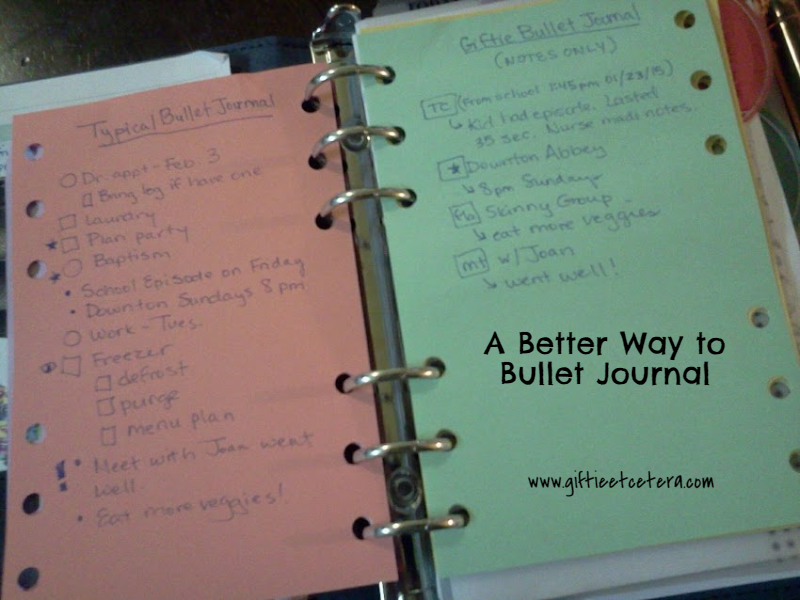
To be fair, I should explain how bullet journaling is done in the typical way. In a typical bullet journal, there is a running list of tasks, events, and notes. Using the codes seen below (on the green page to the right), a running list is created like the one below (same picture, on the orange page to the left).
The typical bullet journal strikes me as difficult to read. The list on the left (typical) appears cluttered and it is difficult to distinguish between separate items. Also, though it allows for some subgrouping, if one entry has a ton of information, it doesn't work very well.
Also, the little eye icon is messy and creepy.
Compare it to my bullet journal, on the right below. On mine, you can quickly see where each entry starts - wherever there is a box.
TIP: When creating bullet journal codes, put a box around them to make them stand out. Indent anything under the main entry (like additional notes or details).
My bullet journal is completely shown in the picture below.
It consists of three parts:
1. Notes (green)
2. Codes (yellow)
3. Events/Tasks (weekly planner page)
A closer look at my codes (yellow) would reveal:
Tasks = Circle
If the task is to set up a PROJECT, I circle a P.
If the task is to FILE an item (in files at home or in notes in the planner), I circle a F.
To mark a task DONE, I check the circle.
To DELETE, I X the circle.
To DEFER, I draw an arrow pointing forward through the circle.
To DELEGATE, I draw an @ symbol (which, in my mind, means that I will do something @fter someone else does).
TIP: Tasks go on the weekly pages instead of hidden among a bunch of random notes. Even if just a notebook is used, put the tasks on a certain pages and notes on another.
Events = #a/#p
#a simply means an a.m. time slot (e.g., 9a).
#p simply means a p.m. time slot (e.g., 2:45p).
An * indicates additional details (like an address or contact number).
Notes = Square
To indicate TELECOM, I write TC in the box.
To indicate EMAIL, I write e'm in the box.
To indicate MEETING, I write mt in the box.
To indicate Facebook, I write fb in the box.
Are you seeing a pattern?
A star means a note that does not belong to any of those subgroups.
An arrow indicates additional information under the note.
TIP: Always indent the arrow.
But please don't limit yourself to my codes! The best bullet journal codes are not the typical ones OR mine.
TIP: Don't skip the step of making a sheet like the yellow sheet as a reference for the bullet journal codes. It's important for memory creation and for reference.
The best bullet journal codes and methods are the ones that you develop, for you. Those will make the most sense to your brain and allow you remember them easily.
It's a lot like making a sandwich. World famous chefs will sometimes dress their very best sandwiches with mayo, but that sandwich is never the best one for me.
Etcetera.
Honestly, I kind of HATE the idea of bullet journaling as planning.
The hate doesn't rise to the level of my hatred for mayo, bare feet on carpet, lies on Facebook, or the violin, but it's still a pretty intense level of negative emotion.
As much as I love the orderly look of a bulleted list of items in a notebook or planner, I rely heavily on the visual impact of the planner pages, created by grouping items and using day and time slots.
I need symbols that I develop (so that the symbols make sense to my brain and so that I remember them).
And, no matter how much I try to brainstorm a reason to have a typical bullet journal, it just makes sense to separate tasks and events from notes. Bullet journals that mix in tasks only make sense to me as an initial brain dumb/capture device.
So I created a better bullet journal.
![]() |
| A Better Way to Bullet Journal |
To be fair, I should explain how bullet journaling is done in the typical way. In a typical bullet journal, there is a running list of tasks, events, and notes. Using the codes seen below (on the green page to the right), a running list is created like the one below (same picture, on the orange page to the left).
![]() |
| Typical Bullet Journal |
The typical bullet journal strikes me as difficult to read. The list on the left (typical) appears cluttered and it is difficult to distinguish between separate items. Also, though it allows for some subgrouping, if one entry has a ton of information, it doesn't work very well.
Also, the little eye icon is messy and creepy.
Compare it to my bullet journal, on the right below. On mine, you can quickly see where each entry starts - wherever there is a box.
TIP: When creating bullet journal codes, put a box around them to make them stand out. Indent anything under the main entry (like additional notes or details).
![]() |
| Typical Bullet Journal Compared to Giftie Bullet Journal |
My bullet journal is completely shown in the picture below.
It consists of three parts:
1. Notes (green)
2. Codes (yellow)
3. Events/Tasks (weekly planner page)
![]() |
| Please consider pinning to Pinterest! Thanks! |
A closer look at my codes (yellow) would reveal:
Tasks = Circle
If the task is to set up a PROJECT, I circle a P.
If the task is to FILE an item (in files at home or in notes in the planner), I circle a F.
To mark a task DONE, I check the circle.
To DELETE, I X the circle.
To DEFER, I draw an arrow pointing forward through the circle.
To DELEGATE, I draw an @ symbol (which, in my mind, means that I will do something @fter someone else does).
TIP: Tasks go on the weekly pages instead of hidden among a bunch of random notes. Even if just a notebook is used, put the tasks on a certain pages and notes on another.
Events = #a/#p
#a simply means an a.m. time slot (e.g., 9a).
#p simply means a p.m. time slot (e.g., 2:45p).
An * indicates additional details (like an address or contact number).
Notes = Square
To indicate TELECOM, I write TC in the box.
To indicate EMAIL, I write e'm in the box.
To indicate MEETING, I write mt in the box.
To indicate Facebook, I write fb in the box.
Are you seeing a pattern?
A star means a note that does not belong to any of those subgroups.
An arrow indicates additional information under the note.
TIP: Always indent the arrow.
But please don't limit yourself to my codes! The best bullet journal codes are not the typical ones OR mine.
TIP: Don't skip the step of making a sheet like the yellow sheet as a reference for the bullet journal codes. It's important for memory creation and for reference.
The best bullet journal codes and methods are the ones that you develop, for you. Those will make the most sense to your brain and allow you remember them easily.
It's a lot like making a sandwich. World famous chefs will sometimes dress their very best sandwiches with mayo, but that sandwich is never the best one for me.
Etcetera.
Sunday, October 5, 2014
Beyond A Calendar: New Ways To Use Your Planner
***This post may contain affiliate links. See my "Disclaimer" link for additional details.***
Yesterday I was stuck in a dollar store, browsing to kill time while my husband and children got hair cuts next door. The store had a display of calendars. Understand, none of the calendars were anything that I would actually purchase. But I like to examine the features.
For example, "mom" calendars these days have separate little squares for each family member. This confuses me.
Mom either needs to know because she is driving/cooking/chaperoning/dressing the kids or she only needs an FYI - in my mind that means two columns are needed, not a random five columns. And what if she has more or less than three kids? I used a Daytimer Family Plus for a while, but the squares were a waste for me. (I loved the layout otherwise.)
What I really focused on, though, were the little pocket calendars. They are about the size of a checkbook and have little sayings or designs on the outside. Inside, they are simply a monthly calendar.
Honestly, for a person who has no stressful planner needs - doesn't input appointments on their cell phone, isn't running a household, isn't a student, and uses something like Outlook at work - one of these would likely succeed in keeping track of a schedule. Add a pretty, tiny notebook, and you might survive the world with a pocket calendar. Maybe.

But a pocket calendar, or a wall calendar, for that matter, simply cannot do what a planner can do for you.
This is my favorite pocket calendar (not like the ones in the dollar store)..
A smart phone might work, if you use it in all the ways that a person can use a planner and if you aren't a person who learns from writing things down. But it would take a lot of work, strategy, and input. I, personally, don't like a lot of work.
A planner, on the other hand, is a tool instead of a mere calendar.
With a planner, you can go so far beyond a calendar.
*Mind Dump
Experienced planners know what a mind dump is - taking everything that is bothering you or keeping you worried or awake and dumping it onto a piece of paper. Mind dumps are not a new idea. Counselors have suggested for decades that you write down your problems before bed (or at 3 a.m. when you wake in a panic). But instead of their silly notepad next to your pillow idea, try your planner.
Valuable ideas, thoughts, and reminders have been lost on random sheets of paper. If you dump your thoughts, but fail to dump them in a place where you can process them later, they are gone. How can you rely on that?
I brain dump directly onto my dashboard (a blank page at the very front of my planner).
*Brainstorm
Brainstorming is different than a brain dump. Brainstorming is purposeful and generally limited to a particular topic.
If I am thinking of ideas for a blog, I might brainstorm.
At the beginning of setting up any project, I brainstorm.
For example, for Christmas, I need to think of everything that I need to plan. Gifts, Santa, wrapping paper, parties, travel, decorations...everything gets brain dumped, but it's a topic-specific dump, without much filtering. Then, I organize the ideas and create a project.
*Sketch
Sometimes, you need a visual of a project. How long will each step take? What order should the outline of the legal memo take? A planner gives you an instant notebook, available to you whenever and wherever you are.
*Draw
A smart phone doesn't let you draw a picture of what you are envisioning. Now, I know that many of you are not artists. But for those who need a visual, paper has a strong advantage over technology.
I don't draw beyond a rogue doodle, but I sketch charts for goals, to visualize progress.
*Note
At a meeting? Meeting with the teacher?
A planner is an excellent place to take notes. I suggest a two-column approach.
*Order
A planner allows you to put initial tasks, subsequent tasks, and follow-ups in that order.
That's pretty hard to do on a smartphone.
*Organize
A planner lets you separate appointments, tasks, notes, and projects.
*Achieve
I'm been trying to lose weight for a long time. The only thing that is helping me achieve that goal and actually working? My planner.
I open it to log calorie intake and exercise. I make notes about what I can do to burn calories in limited time and which snacks are yummy and low-cal.
*Record
A planner gives you a place to record the confirmation number when you book a hotel, that you owe your sister $10, and that it's time to get your hair colored.
*Plan
Finally, unlike mindlessly entering tasks or appointments on a cell phone, and planner, by its nature, helps you actually think about and plan what you will do. You have limited space and have to make decisions on the front end, when you are thoughtful, instead of in a rush later.
If you enjoyed this posts, don't forget to read my other popular posts (in the right sidebar).
Etcetera.
Yesterday I was stuck in a dollar store, browsing to kill time while my husband and children got hair cuts next door. The store had a display of calendars. Understand, none of the calendars were anything that I would actually purchase. But I like to examine the features.
For example, "mom" calendars these days have separate little squares for each family member. This confuses me.
Mom either needs to know because she is driving/cooking/chaperoning/dressing the kids or she only needs an FYI - in my mind that means two columns are needed, not a random five columns. And what if she has more or less than three kids? I used a Daytimer Family Plus for a while, but the squares were a waste for me. (I loved the layout otherwise.)
What I really focused on, though, were the little pocket calendars. They are about the size of a checkbook and have little sayings or designs on the outside. Inside, they are simply a monthly calendar.
Honestly, for a person who has no stressful planner needs - doesn't input appointments on their cell phone, isn't running a household, isn't a student, and uses something like Outlook at work - one of these would likely succeed in keeping track of a schedule. Add a pretty, tiny notebook, and you might survive the world with a pocket calendar. Maybe.
This is my favorite pocket calendar (not like the ones in the dollar store)..
A smart phone might work, if you use it in all the ways that a person can use a planner and if you aren't a person who learns from writing things down. But it would take a lot of work, strategy, and input. I, personally, don't like a lot of work.
A planner, on the other hand, is a tool instead of a mere calendar.
With a planner, you can go so far beyond a calendar.
*Mind Dump
Experienced planners know what a mind dump is - taking everything that is bothering you or keeping you worried or awake and dumping it onto a piece of paper. Mind dumps are not a new idea. Counselors have suggested for decades that you write down your problems before bed (or at 3 a.m. when you wake in a panic). But instead of their silly notepad next to your pillow idea, try your planner.
Valuable ideas, thoughts, and reminders have been lost on random sheets of paper. If you dump your thoughts, but fail to dump them in a place where you can process them later, they are gone. How can you rely on that?
I brain dump directly onto my dashboard (a blank page at the very front of my planner).
*Brainstorm
Brainstorming is different than a brain dump. Brainstorming is purposeful and generally limited to a particular topic.
If I am thinking of ideas for a blog, I might brainstorm.
At the beginning of setting up any project, I brainstorm.
For example, for Christmas, I need to think of everything that I need to plan. Gifts, Santa, wrapping paper, parties, travel, decorations...everything gets brain dumped, but it's a topic-specific dump, without much filtering. Then, I organize the ideas and create a project.
*Sketch
Sometimes, you need a visual of a project. How long will each step take? What order should the outline of the legal memo take? A planner gives you an instant notebook, available to you whenever and wherever you are.
*Draw
A smart phone doesn't let you draw a picture of what you are envisioning. Now, I know that many of you are not artists. But for those who need a visual, paper has a strong advantage over technology.
I don't draw beyond a rogue doodle, but I sketch charts for goals, to visualize progress.
*Note
At a meeting? Meeting with the teacher?
A planner is an excellent place to take notes. I suggest a two-column approach.
A planner allows you to put initial tasks, subsequent tasks, and follow-ups in that order.
That's pretty hard to do on a smartphone.
*Organize
A planner lets you separate appointments, tasks, notes, and projects.
*Achieve
I'm been trying to lose weight for a long time. The only thing that is helping me achieve that goal and actually working? My planner.
I open it to log calorie intake and exercise. I make notes about what I can do to burn calories in limited time and which snacks are yummy and low-cal.
*Record
A planner gives you a place to record the confirmation number when you book a hotel, that you owe your sister $10, and that it's time to get your hair colored.
*Plan
Finally, unlike mindlessly entering tasks or appointments on a cell phone, and planner, by its nature, helps you actually think about and plan what you will do. You have limited space and have to make decisions on the front end, when you are thoughtful, instead of in a rush later.
If you enjoyed this posts, don't forget to read my other popular posts (in the right sidebar).
Etcetera.
Thursday, April 26, 2012
Doctor, Doctor - Organizing My Medicals
Taking care of my extensive medical details, from appointments to follow-ups to filling scripts to actually taking my darn meds, takes up a lot of my day. I have extensive meds-related issues and two young kids (with their own check-ups and colds and FREAKIN' ALLERGIES TO CORN AND SHOE LEATHER AND ZYTHROMAX), making keeping up with all I have to do and remember for our healthcare a major undertaking.
One thing I do is put reminders to make doctors' appointments on my planner's calendar. For yearly checkups, I write the task (Sched Dr. Whoever - 555-5555) with a circle around it in the month where I want to schedule the appointment. The circle means that it is a repeating task, so once I schedule my 6 year old's appointment, I write the same thing in the same month next year (and circle it ;)). My calendar doesn't go into 2013, of course, but I have a Future page divided into 13 parts (each month of next year and 2014+) to write things on that will happen in 2013 and beyond.
I also have a contacts page with all doctors' name, speciality, address, and phone number in my contacts. I don't keep many contacts in my planner (since most can just be loaded into my phone or kept in an easy-to-update Word document more conveniently), but I do keep household help (e.g., housekeeper back when I had one {weeps} or lawn service) and medical contacts, as well as some take-out restaurant contacts, as those are contacts that usually aren't in my phone and I need outside of the house a lot.
In the File part of my planner, I have a straight-up medical log. When I schedule an appointment, I put the doctor's name and speciality on the top right corner of the page, along with the date of the appointment. I jot the meds I am currently taking (they change often enough to merit checking the list before each appointment) and a list of complaints that I have for the doctor. Then I draw a line across the page. Under the line, I write actual notes of the doctor's answers and instructions. Yes, it's a little weird to pull out my planner during a doctor's appointment. But the doctor's seem to like it, even stressing "write this down" for important instructions. I think they know I'm going to take their advice seriously, and for people who actually care about your health, that's a big deal.
Keeping up with taking my meds is more difficult. I used to keep taking meds on my Daily Checklist, along with things like "do a 15 minute quick clean" and "exercise," but even if I do nothing else in a given day, I have to take my heart medicine. If I never step foot in my house, I need to take my asthma meds. So I had to deal with medications differently, as my Daily Checklist is more a guideline than a MUST DO list.
One a week, I put my daily meds into a weekly meds container. I don't need a reminder in my planner to do this, as the weekly container is used daily and sits next to my bed on my nightstand. I have an alarm set on my phone to remind me that if I haven't taken my meds by 9:15 p.m., I need to take them. Once a week, when I refill the weekly container, I write any meds I need refills of on my Errands list so I can pick them up at Target during the week. I also read the bottles to make sure I have refills available and, if I don't, schedule a doctor's appointment. It's a good way to double check that I don't miss a check-up.
My Packing Lists (all versions - the master list, the one for camping, the one for hotels, etc.) all include Meds as an item, so that I remember to pack them if I travel.
For unusual meds (like the four times a day antibiotic I am taking now), I keep the Rx bottle next to my cell phone. I see my cell phone a lot everyday, so it helps me remember to take them. Then, I mark the dates that I need to take them on the bottle in a sharpie markers, and check off when I take them each time. Today's (4 times a day for 7 days) looks like this:
April 25 x x 1 2
26 1
27
28
29
30
May 1
2 x x
Finally, I try to only use on pharmacy and it's at a place where I frequently grocery shop, so it's not too inconvenient.
Let me know if you have any tips for keeping your medical stuff organized.
Etcetera.
One thing I do is put reminders to make doctors' appointments on my planner's calendar. For yearly checkups, I write the task (Sched Dr. Whoever - 555-5555) with a circle around it in the month where I want to schedule the appointment. The circle means that it is a repeating task, so once I schedule my 6 year old's appointment, I write the same thing in the same month next year (and circle it ;)). My calendar doesn't go into 2013, of course, but I have a Future page divided into 13 parts (each month of next year and 2014+) to write things on that will happen in 2013 and beyond.
I also have a contacts page with all doctors' name, speciality, address, and phone number in my contacts. I don't keep many contacts in my planner (since most can just be loaded into my phone or kept in an easy-to-update Word document more conveniently), but I do keep household help (e.g., housekeeper back when I had one {weeps} or lawn service) and medical contacts, as well as some take-out restaurant contacts, as those are contacts that usually aren't in my phone and I need outside of the house a lot.
In the File part of my planner, I have a straight-up medical log. When I schedule an appointment, I put the doctor's name and speciality on the top right corner of the page, along with the date of the appointment. I jot the meds I am currently taking (they change often enough to merit checking the list before each appointment) and a list of complaints that I have for the doctor. Then I draw a line across the page. Under the line, I write actual notes of the doctor's answers and instructions. Yes, it's a little weird to pull out my planner during a doctor's appointment. But the doctor's seem to like it, even stressing "write this down" for important instructions. I think they know I'm going to take their advice seriously, and for people who actually care about your health, that's a big deal.
![]() |
| Daily Checklist |
My Packing Lists (all versions - the master list, the one for camping, the one for hotels, etc.) all include Meds as an item, so that I remember to pack them if I travel.
For unusual meds (like the four times a day antibiotic I am taking now), I keep the Rx bottle next to my cell phone. I see my cell phone a lot everyday, so it helps me remember to take them. Then, I mark the dates that I need to take them on the bottle in a sharpie markers, and check off when I take them each time. Today's (4 times a day for 7 days) looks like this:
April 25 x x 1 2
26 1
27
28
29
30
May 1
2 x x
Finally, I try to only use on pharmacy and it's at a place where I frequently grocery shop, so it's not too inconvenient.
Let me know if you have any tips for keeping your medical stuff organized.
Etcetera.
Sunday, March 4, 2012
A Guided Tour of My Day Planner (Warning: Long and Written for Time Management Geeks Only)
I've been searching the internet for sites that give me ideas about new ways to use my day planner. There are many sites that tell me to put things on my calendar (d'uh) or make a task/to do list (double d'uh). And there are many pictures of day planners in use. There are some great sites about making your own Household Notebook, but my planner needs to be portable and things like emergency contacts and recipes stay near the fridge. You know those sites where women share the mysteries of what is in their purses? I NEED one of those for day planners. Truly, I mean NEED. Much like I NEED chocolate or coffee or air. Since the web is apparently lacking in this sort of thing, I guess I'll have to create it. Of course, if you know of a good website for this purpose(www.plannerisms.com comes close to what I am looking for), let me know.
With no further ado (which is like a PROMISE of further ado and a complete waste of time, right?), a guided tour of my day planner:
EXTERIOR OF PLANNER:
My brown fake leather, zip up day planner is a half sheet (as opposed to 8 1/2 by 11 standard sheet) day planner by Franklin. It's one of the seven hole punched ones. It zips up because I keep papers in it and they fall out of unzipped planners. It's a half sheet because I've tried smaller page planners and they are nice and portable, but I just have too much to do. If I worked full time in a static location (office, home) where I could rely on Outlook or a household notebook, I'd use a smaller planner. But I am currently a stay-at-home mom, a substitute teacher (in many different classrooms), and a volunteer at my kid's school. I am busy and on the road and need to keep everything together and be able to work from home (most days)or the road (substitute days) at a moment's notice. My Franklin planner costs about $50, but after killing three $20 planners within a year, I decided it was worth it to have secure rings and a protective outside cover. You can certainly get such a thing cheaper. I used my Christmas money, but shhhh, don't tell hubby. He doesn't understand that this really is as important to me as Call of Duty maps are to him. If I carry a small purse (ie. for a dinner party), I leave my planner in a tote bag in my car. Otherwise, I buy purses that fit my planner.
INSIDE FRONT COVER:
My inside front cover contains three pockets - a large one, a small one, and a zippered one.
In the large pocket, I keep anything that entered in my calendar or task list, but cannot be tossed until it is complete. For example, I currently have directions to a birthday party that is this weekend, directions for logging on to my child's homework website (only needed until we log on for the first time, so no need to file), the t-ball registration form, a receipt to give to my sister, and a recipe that needs to be typed up and added to my recipe binder.
I use the small section as my in box. It is often empty, as I process it at least twice a week, but currently holds directions for signing up for recycling and my tire receipt to put in my car.
The zippered section is used for my ring warranty, as the ring has to be inspected twice a year and the paper signed, so leaving it in my home filing system is worthless. It saves me from filing and unfiling it twice a year.
FIRST TWO PAGES:
My planner is divided into three main sections. The first section keeps track of stuff that should be done everyday, but does not HAVE to be done. I try to use these sections daily, but on a crazy day or a day on the road, they can be totally ignored. They are for normal days, when I am at home at least for the afternoon and evening.
On the left hand side of the planner, I keep my Master Task List. I list things that should be done, but don't have to be done by a certain date and aren't critical on this ongoing list. For example, it contains things like "organize junk drawer" and "clean oven." If it gets more than a page long, I assign some items to dated pages, delete some items as not important, assign some to my husband, or recopy them on a new master list. I triple space the items and put a big circle to the left of them for checking them off.
On the right, I have my Daily Checklist. I make this checklist on my home computer using Microsoft word and some blank refills for my planner. Across the top, it has headings for: Date, 15QC (15 minute quick clean), Laun (...dry), Dish (...es), Week (one of the chores on the weekly list, typed in small font at the bottom of the page, including dusting/wiping surfaces, sweeping/vacuuming/mopping the floor, toilets and tubs, appliances/electronics/mirrors, car, and two days of choosing something from the master task list), Exer (...cise), Cal (...ories, entered in my on-line journal), Tom (...morrow, meaning putting my stuff together for tomorrow), and Lent (just during Lent, where I am currently getting rid of one unused item a day).
CALENDAR:
I use monthly and weekly calendars. The monthly calendars are tabbed and have a small space for writing tasks. I use these for future planning. For example, today (the day I actually started writing this blog...you know, last week...sigh) is February 25. February and March appointments and dates are currently on being kept in the weekly pages. If I open to those monthly calendars, there is a big X over the pages, so I don't accidentally miss something. If something comes up for April, I write it on the monthly calendar. This gives me an overview of the big picture when planning in advance (like for vacations), but allows me to plan details weekly, which is important for actually getting things accomplished. On the last day of each month, I have a circled Task (circled means when I do it, I have to recopy it to a date in the future - in this case, the last day of the next month) reminding me to copy the upcoming month's monthlies into the weekly calendar. (For birthdays, anniversaries, and other yearly events, I copy the "circled Task" idea, but I put boxes around those yearly repeats. ;)) After December, I keep one page called "Future" with next year's appointments. I just jot them there and enter them when I replace my planner pages each year.
My weekly pages are the heart of my planner system. I use one of those planner bookmarks that says "Today" to mark the current week. Weeks that have already passed at lightly crossed out, so nothing gets accidentally missed.
I like the calendar to my planner to have all the weekdays together on one side and the weekend together on the other. I was lucky enough to find that this year at Wal-mart, of all places. I got Day-Timer Desk FamilyPlus Two-Page-Per-Week pages. Next year, if I can't find those, I will use the Franklin refills that have the days across the top of the page and six large boxes for notes. The point is to have about 5 lines for appointments, as I rarely have more than 5 scheduled things on a given day, about 5 or more lines for tasks on each day, and an FYI/Pending section for each day. Right now, I have eight lines for appointments on any given day, 8 lines for tasks, and 4 lines for pending.
If I find I have a particularly busy day (say, more than 5 appointments or tasks), I made some daily refills on my printer at home and keep them in the file portion of my planner. A very busy day, like the day of my child's birthday party, might get it's own page. I would note that on the weekly planner.
I keep each day's calendar entry pretty sacred, in that I only write down things I really am going to do (or reschedule, purposefully). The decision about how to categorize each entry keeps my day running smoothly. I'll give last Thursday as an example.
I had the following CALENDAR entries: 7 a.m. Sub (...stitute teaching), 2:30 Call School (...back about request to sub tomorrow), 2:30 Pick up Loki, give sister receipt, 4 Carpool (circled because it repeats daily and needs to be reflected on tomorrow, too). Note that some tasks (calling the school and giving my sister the receipt) were time specific, so included on the calendar. I had to call the school at exactly 2:30 p.m. because I cannot call while I am subbing but the school I was calling gets off at 3 p.m. My sister needed the receipt for her wedding reception deposit dropped at my mom's house when I picked up Loki at 2:30.
In the tasks section of Thursday, I had the following TASK entries: freeze leftover roast, freeze chicken breasts, check with office about subbing tomorrow, address envelope for mailing taxes, and print free gymnastics tickets. None of these tasks need to be repeated, so none were circled. Note that they were day-specific tasks. The food needed to be frozen or it would get bad and be wasted. I needed to know if I was scheduled to sub tomorrow. The taxes are time sensitive, although I did not find an envelope so I rescheduled that task for the weekend. And I printed the gymnastics tickets, saving us $15 in entry fees to the gym meet.
In the FYI/Pending section, I had the following PENDING entry: @teacher: resend invites. I was waiting on Ander's teacher to reply and let me know if his birthday party invites were truly missing. They weren't. The FYI/Pending section is really important for items that I assign out to husband (noted by the @ sign and his initials) or just need to know (like FYI - Hubby working late).
In addition to an entry for each day, I have seven lists that I keep in the weekly area of my planner. That might seem excessive. Heck, that's probably excessive. But it works for me. ;) I like these planner pages in particular because they have room for the lists. Many weekly pages don't. If mine didn't, I think I would still keep these lists, but having them in a different place would be really inconvenient. Right now, if I open to my TODAY marker in my weekly planner, I can quickly see everything that needs to be done.
The first three lists(located across the top of my particular planner pages, from left to right) are divided based on context (in true Getting Things Done fashion - read that book if you haven't yet!) and they are TASKS, ERRANDS, and HOME. These lists are sacred because they only contain things that have to be done this week or rescheduled. If something can be done whenever, it goes on the Master List. If something does not need to be done until next week or next month, it goes on whatever weekly or monthly page it needs to be done on. If any of these tasks are date sensitive, the due date goes right after them. If a task goes on to a daily entry, it gets scratched out so it's not listed twice. Tasks that can't be done until something else is done or somebody else does something get started with the @(what/who-I-am-waiting-on) symbols. TASKS can be done anywhere, pretty much. For example, calling to sign up for recycling in my neighborhood is on this week's task list. ERRANDS are things that must be done outside of the house, like inspecting my car or going to the bakery to order a cake. By separating them out from other tasks, I can do them all on the same day and use the ERRANDS list to decide what I need to take with me out of the house (library books to return, perhaps). The HOME list works under the same theory. On the next day that I spend primarily at home, I will do these things.
The fourth list across the top is the MAYBE list. All the things I WANT to do this week, but do not HAVE to get through, go on this list. For example, scheduling an eye doctor appointment doesn't HAVE to be done this week, but must be done soon, before the summer, since I need new prescription sunglasses. It goes on my MAYBE list. Items from my Master List that really need to be tended to get moved to this list.
The fifth list is a dinner menu for the week. Right now, next week's list only has notes on it saying I plan to eat out on Monday's night (a ladies' night) and Friday night (LSU gym meet). Before I go grocery shopping, though, I will plan my menu, starting with items that I have to use (like the salad ingredients that are getting bad in my crisper).
The sixth list is my grocery list. As I run out of something or think of something I need, it goes on this list. I keep a master list of common groceries elsewhere, to glance at each week and see if something important (such as bread) is missing.
The seventh list is my NOTES. If an entry can't fit details, I put a symbol by it (like *A) and start the note with *A. Notes takes up a lot of room on the page. But it allows me to do the following: Calendar Entry - 2 p.m. Ander Birthday Party *A; Note - Bring cake and candles, can arrive by 1:50 p.m., 3456 Jefferson Highway, contact is Julia, 555-555-5555.
FILES:
For the most part, filing gets done at home. Recipes go in a folder in the kitchen or as a favorite in my bookmarks on my computer. But I do have a folder in my planner (for filing items that aren't hole punched). I also have the following files (with a cover sheet listing all categories and a/b, g/h, m/n, and s dividers (because having all of the alphabet adds too much bulk to the planner):
-anniversary list by year (for buying anniversary gifts)
-borrowed (for listing items that I lend out, dates, and noting when they are returned)
-business (ideas for starting my own business)
-cafeteria code (for the kid's school, discarded each year)
-contacts (most addresses are available on my phone or on-line so easily that I no longer put them in my planner, but this is for things like the local takeout joints or my kid's school)
-daily planner refills
-diet (for jotting done calories eaten when I am away from my computer)
-gifts (ideas for friends and family)
-grocery master list (made from four or five weeks of shopping lists)
-jobs (for notes on job applications pending)
-medical (an on-going medical log of all doctor's appointments)
-menu (a master list of common meals that I prepare)
-packing list (a few copies of my master list for making a packing list when I travel)
-passwords
-printer ink (a reminder of the kind of refills I need for my printer)
-recipes (for jotting them down until I get home)
-services (a list of babysitters, lawn care people, and housekeepers, as needed)
-substitute teaching (where my notes for each assignment go)
-taxes (an annual list of what I need to gather to do taxes)
PLASTIC INSERTS:
The plastic inserts in my planner hold the following:
-envelopes
-coupons (I don't use many)
-stamps
-address labels with my address
-rubber bands
-paper clips
-post-its
-my jump drive
Finally, I have a hole punched planner notebook in the back of the planner.
I know this is a lot of detail. But I hope it either gives you ideas of how to use your planner (or iPhone,blackberry, or Droid) or that you give me some!
Etcetera.
With no further ado (which is like a PROMISE of further ado and a complete waste of time, right?), a guided tour of my day planner:
EXTERIOR OF PLANNER:
My brown fake leather, zip up day planner is a half sheet (as opposed to 8 1/2 by 11 standard sheet) day planner by Franklin. It's one of the seven hole punched ones. It zips up because I keep papers in it and they fall out of unzipped planners. It's a half sheet because I've tried smaller page planners and they are nice and portable, but I just have too much to do. If I worked full time in a static location (office, home) where I could rely on Outlook or a household notebook, I'd use a smaller planner. But I am currently a stay-at-home mom, a substitute teacher (in many different classrooms), and a volunteer at my kid's school. I am busy and on the road and need to keep everything together and be able to work from home (most days)or the road (substitute days) at a moment's notice. My Franklin planner costs about $50, but after killing three $20 planners within a year, I decided it was worth it to have secure rings and a protective outside cover. You can certainly get such a thing cheaper. I used my Christmas money, but shhhh, don't tell hubby. He doesn't understand that this really is as important to me as Call of Duty maps are to him. If I carry a small purse (ie. for a dinner party), I leave my planner in a tote bag in my car. Otherwise, I buy purses that fit my planner.
INSIDE FRONT COVER:
My inside front cover contains three pockets - a large one, a small one, and a zippered one.
In the large pocket, I keep anything that entered in my calendar or task list, but cannot be tossed until it is complete. For example, I currently have directions to a birthday party that is this weekend, directions for logging on to my child's homework website (only needed until we log on for the first time, so no need to file), the t-ball registration form, a receipt to give to my sister, and a recipe that needs to be typed up and added to my recipe binder.
I use the small section as my in box. It is often empty, as I process it at least twice a week, but currently holds directions for signing up for recycling and my tire receipt to put in my car.
The zippered section is used for my ring warranty, as the ring has to be inspected twice a year and the paper signed, so leaving it in my home filing system is worthless. It saves me from filing and unfiling it twice a year.
FIRST TWO PAGES:
My planner is divided into three main sections. The first section keeps track of stuff that should be done everyday, but does not HAVE to be done. I try to use these sections daily, but on a crazy day or a day on the road, they can be totally ignored. They are for normal days, when I am at home at least for the afternoon and evening.
On the left hand side of the planner, I keep my Master Task List. I list things that should be done, but don't have to be done by a certain date and aren't critical on this ongoing list. For example, it contains things like "organize junk drawer" and "clean oven." If it gets more than a page long, I assign some items to dated pages, delete some items as not important, assign some to my husband, or recopy them on a new master list. I triple space the items and put a big circle to the left of them for checking them off.
On the right, I have my Daily Checklist. I make this checklist on my home computer using Microsoft word and some blank refills for my planner. Across the top, it has headings for: Date, 15QC (15 minute quick clean), Laun (...dry), Dish (...es), Week (one of the chores on the weekly list, typed in small font at the bottom of the page, including dusting/wiping surfaces, sweeping/vacuuming/mopping the floor, toilets and tubs, appliances/electronics/mirrors, car, and two days of choosing something from the master task list), Exer (...cise), Cal (...ories, entered in my on-line journal), Tom (...morrow, meaning putting my stuff together for tomorrow), and Lent (just during Lent, where I am currently getting rid of one unused item a day).
CALENDAR:
I use monthly and weekly calendars. The monthly calendars are tabbed and have a small space for writing tasks. I use these for future planning. For example, today (the day I actually started writing this blog...you know, last week...sigh) is February 25. February and March appointments and dates are currently on being kept in the weekly pages. If I open to those monthly calendars, there is a big X over the pages, so I don't accidentally miss something. If something comes up for April, I write it on the monthly calendar. This gives me an overview of the big picture when planning in advance (like for vacations), but allows me to plan details weekly, which is important for actually getting things accomplished. On the last day of each month, I have a circled Task (circled means when I do it, I have to recopy it to a date in the future - in this case, the last day of the next month) reminding me to copy the upcoming month's monthlies into the weekly calendar. (For birthdays, anniversaries, and other yearly events, I copy the "circled Task" idea, but I put boxes around those yearly repeats. ;)) After December, I keep one page called "Future" with next year's appointments. I just jot them there and enter them when I replace my planner pages each year.
My weekly pages are the heart of my planner system. I use one of those planner bookmarks that says "Today" to mark the current week. Weeks that have already passed at lightly crossed out, so nothing gets accidentally missed.
I like the calendar to my planner to have all the weekdays together on one side and the weekend together on the other. I was lucky enough to find that this year at Wal-mart, of all places. I got Day-Timer Desk FamilyPlus Two-Page-Per-Week pages. Next year, if I can't find those, I will use the Franklin refills that have the days across the top of the page and six large boxes for notes. The point is to have about 5 lines for appointments, as I rarely have more than 5 scheduled things on a given day, about 5 or more lines for tasks on each day, and an FYI/Pending section for each day. Right now, I have eight lines for appointments on any given day, 8 lines for tasks, and 4 lines for pending.
If I find I have a particularly busy day (say, more than 5 appointments or tasks), I made some daily refills on my printer at home and keep them in the file portion of my planner. A very busy day, like the day of my child's birthday party, might get it's own page. I would note that on the weekly planner.
I keep each day's calendar entry pretty sacred, in that I only write down things I really am going to do (or reschedule, purposefully). The decision about how to categorize each entry keeps my day running smoothly. I'll give last Thursday as an example.
I had the following CALENDAR entries: 7 a.m. Sub (...stitute teaching), 2:30 Call School (...back about request to sub tomorrow), 2:30 Pick up Loki, give sister receipt, 4 Carpool (circled because it repeats daily and needs to be reflected on tomorrow, too). Note that some tasks (calling the school and giving my sister the receipt) were time specific, so included on the calendar. I had to call the school at exactly 2:30 p.m. because I cannot call while I am subbing but the school I was calling gets off at 3 p.m. My sister needed the receipt for her wedding reception deposit dropped at my mom's house when I picked up Loki at 2:30.
In the tasks section of Thursday, I had the following TASK entries: freeze leftover roast, freeze chicken breasts, check with office about subbing tomorrow, address envelope for mailing taxes, and print free gymnastics tickets. None of these tasks need to be repeated, so none were circled. Note that they were day-specific tasks. The food needed to be frozen or it would get bad and be wasted. I needed to know if I was scheduled to sub tomorrow. The taxes are time sensitive, although I did not find an envelope so I rescheduled that task for the weekend. And I printed the gymnastics tickets, saving us $15 in entry fees to the gym meet.
In the FYI/Pending section, I had the following PENDING entry: @teacher: resend invites. I was waiting on Ander's teacher to reply and let me know if his birthday party invites were truly missing. They weren't. The FYI/Pending section is really important for items that I assign out to husband (noted by the @ sign and his initials) or just need to know (like FYI - Hubby working late).
In addition to an entry for each day, I have seven lists that I keep in the weekly area of my planner. That might seem excessive. Heck, that's probably excessive. But it works for me. ;) I like these planner pages in particular because they have room for the lists. Many weekly pages don't. If mine didn't, I think I would still keep these lists, but having them in a different place would be really inconvenient. Right now, if I open to my TODAY marker in my weekly planner, I can quickly see everything that needs to be done.
The first three lists(located across the top of my particular planner pages, from left to right) are divided based on context (in true Getting Things Done fashion - read that book if you haven't yet!) and they are TASKS, ERRANDS, and HOME. These lists are sacred because they only contain things that have to be done this week or rescheduled. If something can be done whenever, it goes on the Master List. If something does not need to be done until next week or next month, it goes on whatever weekly or monthly page it needs to be done on. If any of these tasks are date sensitive, the due date goes right after them. If a task goes on to a daily entry, it gets scratched out so it's not listed twice. Tasks that can't be done until something else is done or somebody else does something get started with the @(what/who-I-am-waiting-on) symbols. TASKS can be done anywhere, pretty much. For example, calling to sign up for recycling in my neighborhood is on this week's task list. ERRANDS are things that must be done outside of the house, like inspecting my car or going to the bakery to order a cake. By separating them out from other tasks, I can do them all on the same day and use the ERRANDS list to decide what I need to take with me out of the house (library books to return, perhaps). The HOME list works under the same theory. On the next day that I spend primarily at home, I will do these things.
The fourth list across the top is the MAYBE list. All the things I WANT to do this week, but do not HAVE to get through, go on this list. For example, scheduling an eye doctor appointment doesn't HAVE to be done this week, but must be done soon, before the summer, since I need new prescription sunglasses. It goes on my MAYBE list. Items from my Master List that really need to be tended to get moved to this list.
The fifth list is a dinner menu for the week. Right now, next week's list only has notes on it saying I plan to eat out on Monday's night (a ladies' night) and Friday night (LSU gym meet). Before I go grocery shopping, though, I will plan my menu, starting with items that I have to use (like the salad ingredients that are getting bad in my crisper).
The sixth list is my grocery list. As I run out of something or think of something I need, it goes on this list. I keep a master list of common groceries elsewhere, to glance at each week and see if something important (such as bread) is missing.
The seventh list is my NOTES. If an entry can't fit details, I put a symbol by it (like *A) and start the note with *A. Notes takes up a lot of room on the page. But it allows me to do the following: Calendar Entry - 2 p.m. Ander Birthday Party *A; Note - Bring cake and candles, can arrive by 1:50 p.m., 3456 Jefferson Highway, contact is Julia, 555-555-5555.
FILES:
For the most part, filing gets done at home. Recipes go in a folder in the kitchen or as a favorite in my bookmarks on my computer. But I do have a folder in my planner (for filing items that aren't hole punched). I also have the following files (with a cover sheet listing all categories and a/b, g/h, m/n, and s dividers (because having all of the alphabet adds too much bulk to the planner):
-anniversary list by year (for buying anniversary gifts)
-borrowed (for listing items that I lend out, dates, and noting when they are returned)
-business (ideas for starting my own business)
-cafeteria code (for the kid's school, discarded each year)
-contacts (most addresses are available on my phone or on-line so easily that I no longer put them in my planner, but this is for things like the local takeout joints or my kid's school)
-daily planner refills
-diet (for jotting done calories eaten when I am away from my computer)
-gifts (ideas for friends and family)
-grocery master list (made from four or five weeks of shopping lists)
-jobs (for notes on job applications pending)
-medical (an on-going medical log of all doctor's appointments)
-menu (a master list of common meals that I prepare)
-packing list (a few copies of my master list for making a packing list when I travel)
-passwords
-printer ink (a reminder of the kind of refills I need for my printer)
-recipes (for jotting them down until I get home)
-services (a list of babysitters, lawn care people, and housekeepers, as needed)
-substitute teaching (where my notes for each assignment go)
-taxes (an annual list of what I need to gather to do taxes)
PLASTIC INSERTS:
The plastic inserts in my planner hold the following:
-envelopes
-coupons (I don't use many)
-stamps
-address labels with my address
-rubber bands
-paper clips
-post-its
-my jump drive
Finally, I have a hole punched planner notebook in the back of the planner.
I know this is a lot of detail. But I hope it either gives you ideas of how to use your planner (or iPhone,blackberry, or Droid) or that you give me some!
Etcetera.